





748C20AA6AFF40368CF6345453F8815A.jpg)
.jpg)








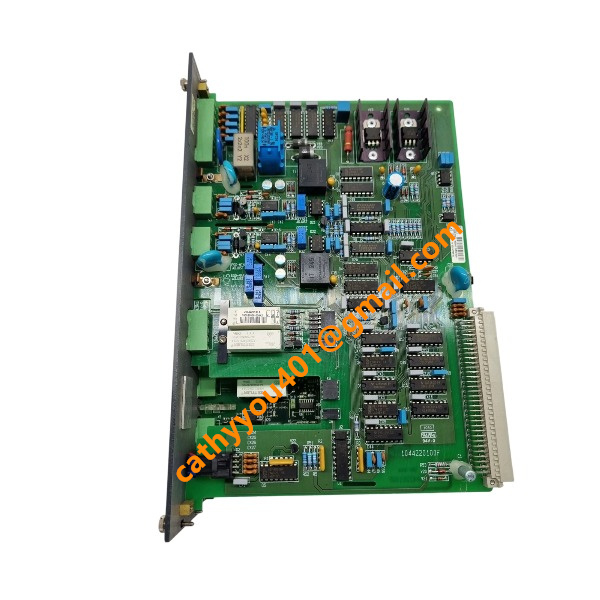
Description
-
BrandDEIF
-
ModelPCM 4.1 1044230010K
-
Product NamePower Control Module
-
Place of Origin
-
Customs HS Code
-
Power Supply
-
Dimensions
-
Weight
-
Operating Temperature
-
Storage Temperature
-
Warranty
-
Product Status
Wiring and Connection for DEIF PCM 4.1 (1044230010K)
Rack and Backplane Bus Installation
Install the PCM 4.1 module into a standard Delomatic 4 rack and fasten it with built-in locking latches. The internal rack backplane bus provides centralized internal power and high-speed data communication, enabling seamless data interaction and system synchronization with slave modules such as SCM4.2. Install the module strictly in accordance with the system topology and rack slot layout requirements.
Auxiliary 24 VDC Power Supply Connection
Connect an isolated external 24 VDC power supply to the PCM 4.1’s +24 V and 0 V terminals. Adopt shielded twisted-pair cables for power wiring. This dedicated power loop is prohibited from sharing with high-current loads and large solenoid actuators to avoid voltage fluctuation and signal interference. Strictly verify wiring polarity before powering on the device.
Ethernet Communication Connection
The onboard Ethernet port is dedicated for local parameter configuration, equipment debugging and remote system monitoring via DEIF Smart Connect software. Use standard CAT5e/CAT6 network cables for direct laptop connection or local switch networking to realize parameter upload, download and real-time fault diagnosis.
CAN Bus Communication Wiring
The CAN bus interface supports communication with engine ECUs, genset parallel networks and distributed control systems. Use shielded twisted-pair cables for wiring. Install 120 Ω terminal resistors at both extreme ends of the entire CAN network to ensure signal stability. Isolate CAN communication cables from high-voltage power cables to prevent electromagnetic interference.

Binary Digital Inputs
All digital inputs are designed for passive potential-free dry contact signals, applicable for circuit breaker status feedback, remote start/stop commands, external fault signals and system operation permission signals. All digital input points share a unified common terminal to simplify wiring structure.
Relay Digital Outputs
Equipped with potential-free relay contacts for master system control functions, including circuit breaker closing/tripping, global fault alarm and operating status remote indication. Match the external power supply voltage according to the actual specification of on-site actuator coils to ensure reliable output action.
Analogue Inputs (4–20 mA)
4–20 mA analogue channels are used for auxiliary signal collection, covering battery status, fuel tank liquid level and other on-site process parameters. Use shielded twisted-pair cables with single-point shielding grounding to guarantee stable and accurate analogue signal transmission.
Serial Communication (RS485 / Modbus)
The RS485 interface supports Modbus RTU protocol for data docking with SCADA and third-party control systems. Wire with shielded twisted-pair cables and install a terminal resistor at the tail end of the Modbus bus to eliminate signal reflection and ensure long-distance communication stability.
Synchronisation with SCM4.2 and Other Slave Modules
No additional signal wiring is required between PCM 4.1 and SCM4.2 slave modules. All data interaction, logic synchronization and power supply distribution are completed through the rack backplane bus. The PCM 4.1 acts as the master module to uniformly control and manage all slave modules in the same rack.
Shielding and EMC Rules
All weak-current signal cables must adopt shielded twisted pairs, with cable shields grounded at a single point only. Classify and lay high-voltage AC cables, power cables and weak-current signal cables in separate cable trays to effectively suppress electromagnetic interference and improve system EMC performance.
Pre-power Check and Configuration
Confirm all backplane connectors are fully and securely inserted. Inspect circuit insulation resistance and eliminate short-circuit risks. After completing all wiring, connect the device via Smart Connect software to configure system operation mode, genset numbering, CAN baud rate, Modbus communication and other core parameters.
Safety Precautions
All wiring and installation operations must be performed in a fully de-energized state with standard LOTO safety procedures implemented. Hot plugging and unplugging of rack modules during system operation is strictly prohibited. All construction and wiring work shall comply with local electrical safety codes and grounding specifications.

Parameter Setup for DEIF PCM 4.1 (1044230010K)
1. Pre-setup Preparation
Complete the mechanical installation and full wiring of the PCM4.1 master module, SCM4.2 slave modules and rack backplane. Fully verify the completion and correctness of 24 VDC auxiliary power, Ethernet, CAN bus, digital I/O and RS485 wiring.
Install the official DEIF Smart Connect configuration software on a laptop and prepare a standard CAT5e/CAT6 Ethernet cable. Check the hardware rotary ID switch S5 on the module to ensure each DGU node owns a unique address and no duplicate IDs exist on the ARC network. Implement standard LOTO safety procedures and confirm no short-circuit faults in the circuit before powering up the control rack.
2. Establish Communication Connection
Connect the laptop Ethernet interface to the PCM4.1 Ethernet port either directly or through a local network switch. Set the laptop static IP to match the same subnet as the PCM4.1 default address.
Launch Smart Connect software, scan for online devices and establish a stable connection with the target PCM4.1 module. Prior to any parameter modification, read and back up the original parameter configuration, then save the backup file locally for future recovery and reference.
3. Basic System Configuration
Configure core system operating modes including application scenarios (land-based or marine genset) and operating logic (parallel operation or isolated island mode). Set the system rated frequency to 50 Hz or 60 Hz according to on-site standards.
Define the overall system topology, including the number of SCM slave modules, genset serial numbers and rack slot corresponding relationships. Calibrate the system time and date to ensure accurate timestamp recording for event logs and fault alarms.
4. Measurement & Transformer Parameters (Matched with SCM4.2)
Set the rated operating voltage of generators and busbars. Configure VT transformation ratios (primary and secondary voltage parameters) if external voltage transformers are adopted. Select the CT secondary specification (1 A or 5 A) and set the rated primary current value of current transformers.
All voltage and current measurement parameters will be automatically synchronized between PCM4.1 and SCM4.2 through the rack backplane bus to ensure consistent sampling and calculation data.
5. Communication Parameter Configuration
Configure CAN bus parameters: select a reasonable baud rate within 125–1000 kbps, enable the matching engine ECU communication protocol and complete CAN bus termination configuration.
Set RS485 Modbus RTU parameters, including slave station address, baud rate, check mode and stop bits, and complete Modbus register mapping to support data interaction with SCADA and third-party systems.
Configure Ethernet static IP, subnet mask and gateway to support remote monitoring, online debugging and software connection access.
6. Digital Input & Output Definition
Define functions for all passive dry-contact digital inputs, covering remote start/stop commands, circuit breaker position feedback, external fault signals and system operation permission signals.
Configure functional logic for relay outputs, including breaker closing/tripping control, global fault alarm and equipment operating status indication. Set reasonable DI signal filtering delay and relay output pulse duration to avoid misoperation.
7. Protection & Control Setpoints
Calibrate electrical protection thresholds for overvoltage, undervoltage, overfrequency, underfrequency, overcurrent and reverse power to meet system safety protection requirements.
Set synchronization parameters including synchronization window range, allowable voltage deviation, frequency deviation and phase angle deviation.
Configure load control strategies such as base load operation, peak shaving, average load sharing and mains power import/export control. Set system timer parameters including purge duration, start delay, cooling stop delay and fault reset delay.
8. Analogue Input Configuration
Configure 4–20 mA analogue input channels for auxiliary monitoring signals such as battery status, fuel level and equipment pressure. Complete signal scaling calibration and set fault detection thresholds to identify abnormal analogue signal loss or deviation.
9. Logic and Application Function Setup
Set genset start/stop priority and automatic sequence control logic. Configure fault processing rules including alarm latch function, fault trip classification and manual/automatic fault reset modes. Customize interlock protection logic according to on-site project technical requirements.
10. Download, Verify and Backup
After completing all parameter edits, download and write the full configuration to the PCM4.1 module via Smart Connect software. Reboot the module to activate all new parameters.
Monitor real-time operating data including voltage, current, frequency and digital I/O status to verify signal consistency and data accuracy. Conduct no-load tests for protection logic, synchronization function and unit sequence control to confirm normal operation.


.jpg)

.jpg)
.jpg)







