





D3CEF997EC4D46D2B2218226C163E6EC.jpg)
.jpg)
.jpg)







Description
-
BrandNotifier
-
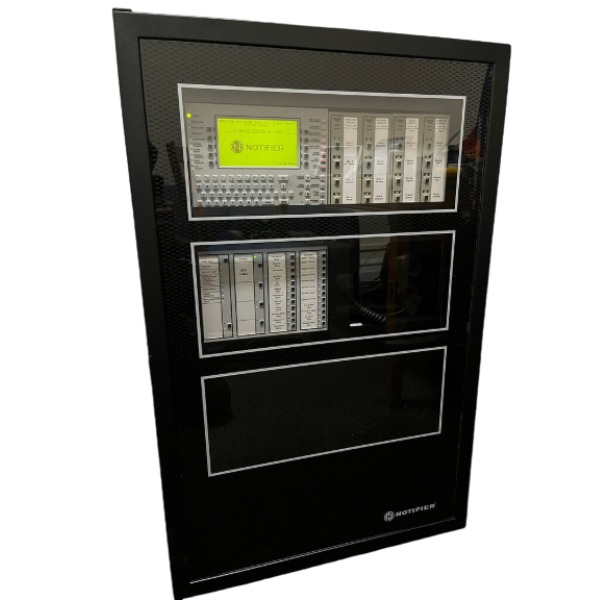
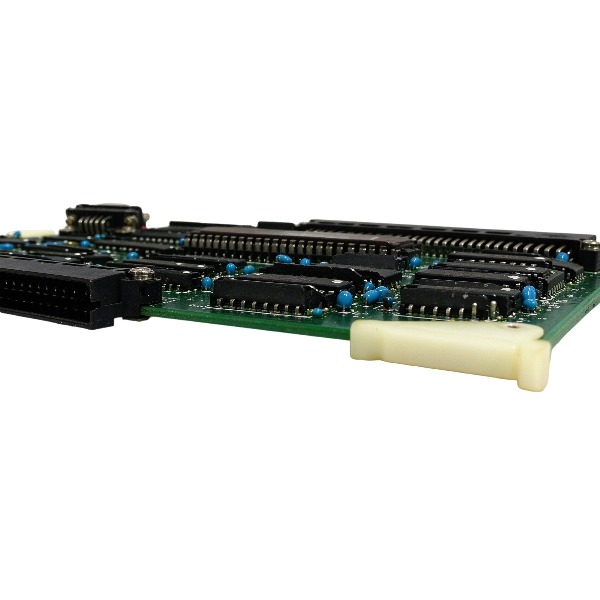
ModelCPU2-3030D NFS2-3030
-
Product NameCPU & Display Assembly for NFS2-3030 Intelligent Addressable Fire Alarm Panel
-
Place of OriginUnited States
-
Customs HS Code85311000
-
Power Supply0.34 A
-
Dimensions312mm × 226mm × 42mm
-
Weight1.35 kg
-
Operating Temperature0°C to +49°C
-
Storage Temperature-20°C to +70°C
-
Warranty1 year
-
Product Statusoriginal
CPU2-3030D / NFS2-3030 Notifier Diagnostic Procedure
Visual & LED Check
Examine front panel LEDs including CPU Failure, System Trouble, Supervisory, Pre-Alarm and Point Disabled indicators. A steady or flashing CPU Failure LED denotes a CPU hardware or firmware fault. Capture all active trouble and alarm messages displayed on the LCD.
Power Supply Diagnosis
Measure AC main input voltage and 24VDC battery output. Verify battery charging voltage within the normal range of 20.4V~27.6V. Test battery performance by disconnecting AC supply and running the panel on battery power alone. Confirm the panel recognizes the AMPS-24 power supply, and inspect wiring plus the J5 auxiliary connector.
System Message & History Review
Access the event history log to retrieve trouble codes, SLC loop failures, duplicate address alerts, device communication timeouts and DSBUS errors. Differentiate point-level faults (field detectors or modules) from system-level faults (CPU, power supply, backplane, LCM card).
Service Screen & Firmware Version Check
Press and hold the LAMP TEST button for more than 5 seconds to enter the service screen. Read firmware versions of the CPU and LCM modules, and validate cross-version compatibility.
SLC Loop & Field Device Test
Inspect SLC cabling for short circuits, open circuits and ground faults, and check the end-of-line resistor. Execute a loop scan to identify duplicate address conflicts and device self-test failures. Isolate defective detectors or modules by disconnecting problematic loop branches one by one.

CPU Board & Backplane Inspection
Power down the panel and wait 30 seconds. Extract the CPU2-3030D board, inspect it for burn marks, corrosion, loose pins and the memory backup battery. Reinstall the CPU card securely onto the backplane and check all ribbon cables.
Software & Database Diagnostic
Use VeriFire Tools to validate the panel programming database. Reboot the panel; temporarily clear the database to check whether the fault arises from corrupted configuration. Re-download firmware or the database if a software corruption alarm triggers.
Reset & Functional Test
Carry out a SYSTEM RESET initially. If the fault remains, perform a full power cycle: cut off AC power, disconnect the battery, wait 30 seconds and restore power. After rebooting, run lamp test, keypad test, SLC loop scan, and alarm & relay output tests.
Isolation & Spare Swap
Replace the original card with a verified good spare CPU2-3030D to determine if the fault originates from CPU hardware or external wiring / peripheral cards.
Final Record
Save event logs, firmware versions, trouble codes and all test results. Contact Honeywell technical support if the CPU hardware fault continues.

Read Fault Information
Press ACKNOWLEDGE to mute the buzzer, then review fault codes and text messages on the LCD. Enter event history to differentiate point faults (field detectors/modules), loop faults and system faults (CPU, power supply, backplane, communication cards). Document fault codes for troubleshooting.
Power Supply Fault Handling
Examine the AMPS-24 power supply and measure AC input and 24VDC output. Normal float charging voltage is 20.4V to 27.6V.
Inspect battery wiring and battery condition. Replace the battery directly when low voltage is detected.
For the NO POWER SUPPLY INST fault: validate the power supply address and type settings within the programming database, and confirm healthy communication between the SLC loop and power supply unit.
SLC Loop Faults (LOOP COMM FAILURE, Short / Open Circuit, Address Conflict)
Disconnect the loop and test cables for short circuits, open circuits and ground leakage; inspect the end-of-line resistor.
Execute a loop scan to identify duplicate address conflicts and reassign addresses for conflicting field devices.
Isolate faulty detectors or modules by disconnecting loop branches segment by segment, then replace defective field hardware.
CPU2-3030D Main Board Fault (CPU Failure LED Illuminated)
Press and hold LAMP TEST for 5 seconds to access the Service Screen. Check CPU and LCM firmware versions and confirm compatibility.
Power down the panel, extract the CPU board and inspect backplane gold fingers for oxidation or burn damage. Clean and securely reseat the board, and verify all ribbon cables.
NVRAM battery fault: replace the onboard backup battery and calibrate the system clock.
Corrupted database (PROGRAM CORRUPTED): use VeriFire Tools to clear the panel database, reload the backup program and reboot the panel. Re-flash compatible firmware for firmware anomalies.
Network / Communication Faults (NCM COMM LOSS, DSBUS Fault)
Check wiring and terminating resistors for the NCM network module. Verify node count and network mapping configuration.
Inspect DSBUS wiring, resolve bus short circuits and device self-test failures, and reboot faulty bus-mounted modules.
Unresponsive Keypad or Panel
Perform SYSTEM RESET first. If unresolved, fully cut AC and battery power, wait 30 seconds and restore power. If the panel remains locked, check the contact between the CPU board and backplane or confirm CPU hardware failure.
Board Replacement Verification (Fault Isolation)
Swap the original card with a tested good spare CPU2-3030D. If the fault vanishes, the original CPU hardware is defective. If the fault persists, the issue resides in the backplane, power supply, field loop or programming.
Reset and Function Verification
After fault rectification, power on the system and run Lamp Test, keypad test and SLC loop scan. Test fire alarm, supervisory signal and relay output functions. Confirm all faults are cleared and event logs record normally.
Logging and Reporting
Preserve event logs, firmware versions, fault codes and test records. Contact Honeywell technical support if recurring CPU hardware errors continue.

FAQ for CPU2-3030D NFS2-3030 Notifier
Q: What brand are CPU2-3030D and NFS2-3030?
A: CPU2-3030D and NFS2-3030 are fire alarm control panel components manufactured by Notifier.
Q: What is NFS2-3030 Notifier?
A: NFS2-3030 is a high-performance intelligent fire alarm control panel from Notifier for commercial fire protection systems.
Q: What is CPU2-3030D?
A: CPU2-3030D is the main central processing unit card for Notifier NFS2-3030 fire alarm panel.
Q: Is CPU2-3030D compatible with NFS2-3030 fire panel?
A: Yes, CPU2-3030D is the dedicated CPU board designed for Notifier NFS2-3030 fire alarm control system.
Q: What applications use Notifier NFS2-3030 and CPU2-3030D?
A: They are commonly installed in office buildings, hotels, hospitals, shopping malls, factories and large commercial fire safety projects.
Q: Can you supply brand new original Notifier CPU2-3030D and NFS2-3030?
A: We offer brand new original, surplus new and refurbished Notifier CPU2-3030D and NFS2-3030, confirm item condition before quotation.
Q: Does Notifier CPU2-3030D come with warranty?
A: All Notifier CPU2-3030D and NFS2-3030 units we supply include standard warranty.
Q: Will you test CPU2-3030D before shipment?
A: Yes, we carry out functional testing for Notifier CPU2-3030D prior to delivery.



.jpg)
.jpg)
.jpg)







