.jpg)
.jpg)
.jpg)







Description
-
BrandYOKOGAWA
-
ModelV8219VQ
-
Product NameDCS Analog Input Module
-
Place of OriginJapan
-
Customs HS Code85423190
-
Power Supply0.26 A
-
Dimensions245mm × 120mm × 35mm
-
Weight0.76 kg
-
Operating Temperature-20°C to +70°C
-
Storage Temperature-40°C to +85°C
-
Warranty12 month
-
Product Statusnew and original
YOKOGAWA V8219VQ Operation Guide
Safety Precautions
Disconnect both main AC power (220/380/440 V AC, 50/60 Hz) and 24 V DC backup supply before installing, removing or servicing the board. Wait at least 60s for capacitor discharge.
This board contains ESD-sensitive CMOS chips. Wear grounded wrist strap and use anti-static mat during handling. Keep away from moisture, oil vapor and salt spray.
Operating ambient temperature: 0 ~ +55 °C; storage temperature: −25 ~ +70 °C; relative humidity: 5%–95% non-condensing.
Hot swap is forbidden. Board insertion/removal under power may damage hardware and cause unexpected steering.
Installation and Wiring
Open MCU chassis cover. Align V8219VQ with designated backplane slot, match connector keying, insert fully and fasten front retaining screws. Check adjacent cards and cable routing.
Field wiring connects to terminal block or D-sub connector following system schematic. Typical signals: gyrocompass heading (NMEA 0183, RS‑422/RS‑485), auxiliary compass, ship speed log, rudder feedback, alarm relay outputs and 24 V DC power.
Use shielded twisted-pair cables for signals, single-end shield grounding. Avoid parallel routing with high-voltage cables. After wiring, check terminal tightness and no exposed wire strands.
Power-Up Procedure
Close chassis cover before power on. Power sequence: switch on 24 V DC backup supply first, then main AC supply.
Check LED indicators on V8219VQ and AP CDU. Power LED shall light steadily within several seconds. System runs self-test automatically; valid heading reading appears on CDU in around 30 seconds.
If alarms pop up on annunciator or display, refer to troubleshooting section. Confirm system selector on correct autopilot channel and heading value matches gyrocompass.
Normal Operation
V8219VQ runs in background without manual adjustment during vessel navigation, transferring serial data between autopilot CPU and external sensors. Operate via AP CDU panel and mode switches.
AUTO mode: select system No.1/No.2, press AUTO key. Current heading will be set as target course.
HAND mode: turn steering wheel or press HAND button for manual rudder control.
NFU steering: move NFU lever to directly drive rudder; rudder stops once lever releases.
All parameter configuration is completed via AP CDU maintenance menu.
Maintenance Mode Access
For V8219VQ and its I/O channel setup on AP CDU keypad:
Press ADJUST → select "ADJUST MODE 99" with arrow keys → press ENTER and input maintenance password.
Maintenance menu covers items from MAINTENANCE 1 to MAINTENANCE 27. MAINTENANCE 1 (I/F SET-UP) configures serial parameters: baud rate, data format, port assignment, NMEA sentence selection and checksum toggle.
Navigate with arrow keys and confirm settings with ENTER. System exits maintenance mode automatically after 1 hour of idle keypad.

Configuration Settings
Gyro input port: match baud rate with gyro (4800 bps for NMEA 0183; 9600 bps for Yokogawa CMZ proprietary protocol). Select HDT/HTC/HEHRC/HCHRC sentences and enable/disable checksum per sensor specs.
Auxiliary compass: assign source as second gyro, magnetic compass or GNSS heading sensor.
Log speed input: choose corresponding speed format (VMVSD for Yokogawa log, VBW/STW/SOG for NMEA).
Output ports: set transmit interval (1s recommended for heading output to annunciator, VDR, ECDIS).
Vessel parameters (ship type, block coefficient, LBP, navigation speed) are set in MAINTENANCE 11, which affects control loop tuning.
Troubleshooting
1. Power LED off: inspect 24 V DC backplane voltage and confirm full board seating.
2. Power LED on, communication LED no blink: check CAN bus termination and serial cable, especially shield connection.
3. [SCS] COMM Error / Timeout: MCU fails to receive board data over 3s. Power down, reseat V8219VQ and verify baud rate & port configuration.
4. Unstable heading reading: review NMEA sentence selection and checksum setting.
5. No rudder response in AUTO: check rudder feedback wiring and servo gain parameters.
6. Power loss alarm: measure AC & DC voltage at power input terminals.
Maintenance and Inspection
Perform visual inspection every 12 months or during annual ship survey. Check corrosion, loose connectors, burnt components and damaged capacitors. Clean dust/salt residue with dry soft brush; liquid cleaner is prohibited. Retighten all terminal and retaining screws, verify LED status during operation.
Keep spare V8219VQ onboard. This legacy model has long lead time for replacement.
When replacing the card, copy original parameters via maintenance menu or restore saved parameter file. After replacement, carry out full function test: AUTO course keeping test, HAND/NFU mode switching and alarm verification.

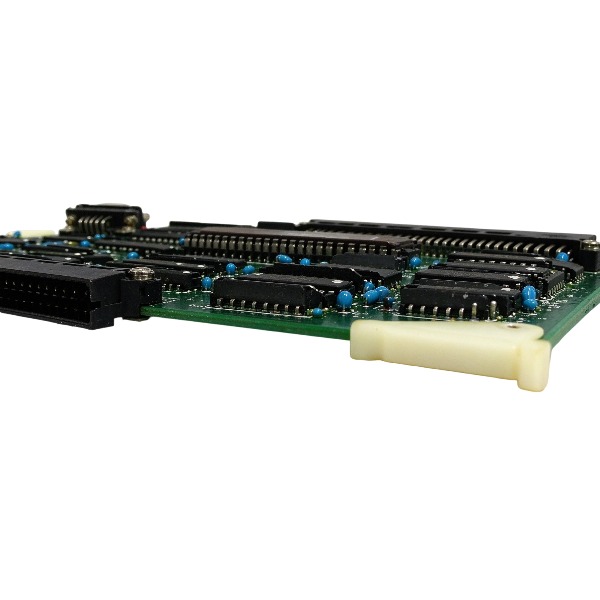
The V8219VQ interface PCB card is designed exclusively for the main control unit (MCU) of Yokogawa PT500 / PT900 marine autopilot systems.
Ocean-going cargo vessels, tankers, bulk carriers and container ships
It acts as the autopilot heading control signal interface board. It acquires signals from gyrocompass, magnetic compass, GNSS heading sensor, ship speed log and rudder feedback, and transfers processed data to the autopilot CPU through CAN bus and serial links. AUTO, HAND and NFU steering modes are supported.
Coastal freighters, fishing vessels, offshore supply vessels and high-speed crafts
It enables NMEA 0183 / RS-422 / RS-485 data communication between the autopilot and navigation sensors, and outputs heading data to external marine devices such as VDR, ECDIS and alarm annunciators.
Vessel track control steering (TCS)
It interfaces route command signals from ECDIS to maintain automatic track-keeping, and supports the fuel-saving optimized steering function of the PT900 autopilot.
Dual-redundant autopilot system (Channel No.1 / No.2)
It serves as the I/O interface within redundant heading control systems to implement channel switching, signal collection and alarm relay output.
Vessel retrofitting and spare part replacement
This legacy card is used for maintenance, overhaul and system upgrade of existing onboard PT500/PT900 autopilots. It can replace defective interface boards without full autopilot system replacement.
Vessel sea trial and commissioning
It is applied for autopilot commissioning, parameter calibration and function verification during dock tests and sea trials. Serial baud rates, NMEA sentences and vessel parameters can be set via the maintenance menu.

FAQ for V8219VQ YOKOGAWA
Q: What brand is V8219VQ?
A: V8219VQ is a product manufactured by Yokogawa.
Q: What is the type of Yokogawa V8219VQ?
A: Yokogawa V8219VQ is an industrial control module for DCS system applications.
Q: What systems is Yokogawa V8219VQ compatible with?
A: Yokogawa V8219VQ is designed to work with Yokogawa DCS control systems.
Q: Is Yokogawa V8219VQ new or refurbished?
A: We can supply brand new original, surplus new and refurbished Yokogawa V8219VQ, please confirm the condition before quotation.
Q: What is the lead time for Yokogawa V8219VQ?
A: Normally 1-2 weeks for stocked Yokogawa V8219VQ; longer lead time if out of stock.
Q: Does Yokogawa V8219VQ come with warranty?
A: All Yokogawa V8219VQ we provide come with a standard warranty period.
Q: Can you test Yokogawa V8219VQ before shipment?
A: Yes, we will perform function testing for Yokogawa V8219VQ prior to delivery.


.jpg)

.jpg)
.jpg)