





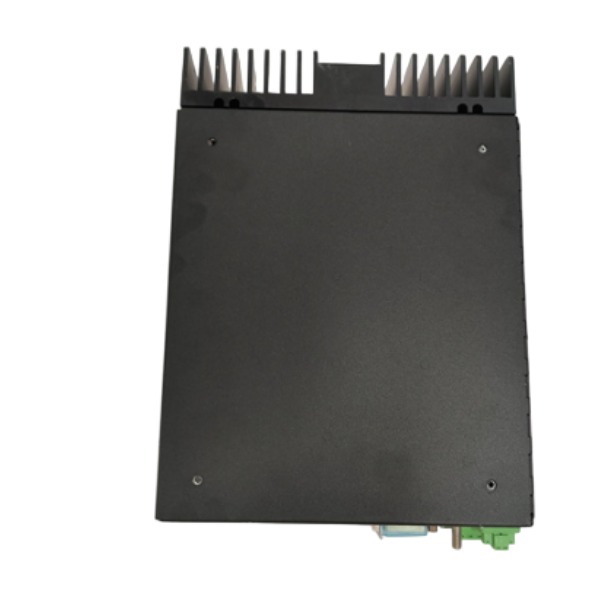







Description
-
BrandValmet
-
ModelD202593
-
Product NameDistributed Control Unit Controller Module
-
Place of OriginFinland
-
Customs HS Code85371011
-
Power Supply10 ~ 32 V DC
-
Dimensions85mm × 30mm × 25mm
-
Weight0.15 kg
-
Operating Temperature-20°C ~ +60°C
-
Storage Temperature-40°C ~ +60°C
-
Warranty12 month
-
Product Statusoriginal
Valmet D202593 Characteristics
D202593 is a distributed control unit (DCU) originally developed by Metso and now branded under Valmet. It acts as a compact integrated controller and I/O module for distributed automation systems.
Core Function
It integrates PLC logic control and local I/O processing. The unit supports standalone on-site computation and closed-loop control without full dependency on the central controller. Multiple DCUs can communicate with one another to achieve coordinated system operation.
Communication Interface
Comes with PROFIBUS DP fieldbus interface with a maximum baud rate of 12 Mbaud.
It supports Modbus, Ethernet/IP and other mainstream industrial protocols to connect field instruments and control components.
A single unit can connect up to 24 I/O modules.
Mechanical & Environmental Specifications
Protection class: IP67
Relative humidity: up to 95% non-condensing
Its compact form enables field mounting outside control cabinets.
Performance & Reliability Features
Integrated comprehensive fault diagnosis enables rapid fault localization and maintenance.
Robust EMC protection ensures stable operation under industrial temperature variations and electromagnetic interference.
High MTBF rating, engineered for long continuous operation within process industries.
Modular expandability supports flexible construction of distributed control systems.
Application
Commonly deployed in process automation, flow control, discrete manufacturing and other industrial applications to perform local distributed control.

How to install and configure D202593
1. Pre-installation Preparation
Cut off rack power and disconnect the 24VDC supply before any work. Inspect the module for physical damage. Confirm the TP867 baseplate is undamaged and compatible with D202593. Ensure the power supply is 24VDC ±10%. Select an installation site within -20°C ~ +60°C and 5%~95% non-condensing humidity. Keep the unit away from intense vibration, heat sources and severe electromagnetic interference.
2. Mechanical Installation
Install the TP867 baseplate on the standard DIN rail inside the control cabinet. Slide D202593 into the baseplate slot and fasten the mechanical latch to guarantee stable backplane contact. Complete field signal wiring at the base terminal blocks. Use shielded cables with 360° shield grounding to meet EMC requirements. Separate power cables from signal cables to minimize crosstalk.
3. Wiring and Power Inspection
Feed 24VDC power to the baseplate. Route field I/O signals to the corresponding terminals on the baseplate. Connect Ethernet cables to dual network ports for Profinet IO communication. Fully inspect all wiring, short-circuit condition and insulation resistance before power-on. Verify the PE protective earth connection is secure.
4. Software Configuration with Valmet DNA Engineering Tool
Open Valmet DNA engineering software and create a new project for the AC 800M controller. Import the GSDML file of D202593 module. Add D202593 into the Profinet IO device list, then assign a unique device name and IP address. Map I/O channels, configure communication cycle parameters, and set redundancy functions if dual-network redundancy is needed. Download the compiled project to the AC 800M controller.
5. Commissioning and Diagnosis
Power up the rack and check the module LED status indicators. Use DNA Explorer to confirm online module recognition and Profinet communication. Run channel diagnostic tests on every I/O point to detect short-circuit, open-circuit and signal quality alarms. Carry out online data verification to validate input acquisition and output response. Save all parameters once commissioning succeeds.
6. Safety & Troubleshooting Notes
Never insert or remove the module while power is applied. Improper grounding leads to communication interruption and false alarms. If the module cannot be identified, check the IP address, GSDML version, cable crimping and baseplate contact. Firmware updates shall only be performed using official Valmet tools. Halt operation immediately if overheating or persistent fault alarms appear.



.jpg)







