





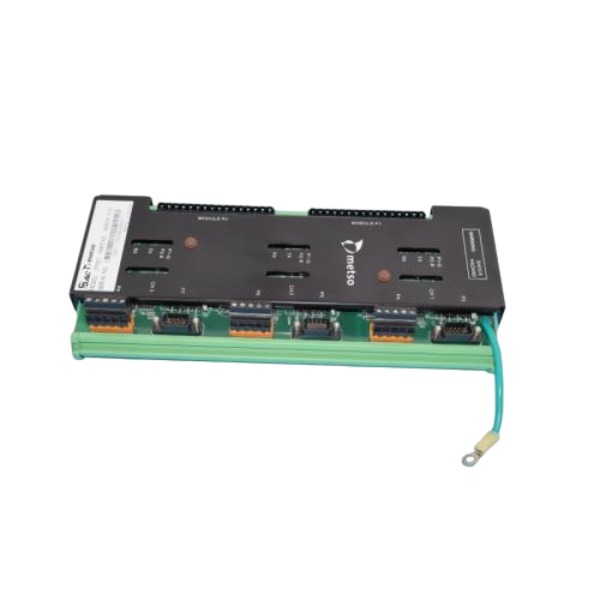







Description
-
BrandMETSO
-
ModelITP201
-
Product NameIntelligent Transmitter Processor Module
-
Place of OriginFinland
-
Customs HS Code853890
-
Power Supply24 VDC
-
Dimensions180 mm × 95 mm × 35 mm
-
Weight0.42 kg
-
Operating Temperature-20℃ ~ +60℃
-
Storage Temperature-40℃ ~ +80℃
-
Warranty1 year
-
Product Statusnew and original
Diagnostics for Metso ITP201
Pre-check & Safety Preparation
Carry out lockout-tagout and cut off rack power prior to inspection. Wear an anti-static wristband to prevent electrostatic damage. Inspect the module installation and ensure terminals are securely tightened. Prepare a multimeter and Metso DCS engineering software for diagnostic work.
Power Supply Inspection
Measure the backplane supply voltage feeding the ITP201 and confirm it complies with rated specifications. Check for loose terminals, voltage drop and ripple. Inadequate or unstable power may prevent the module from starting, trigger frequent resets or result in lost channel signals. Verify the power source has sufficient capacity and appropriate fuse protection.
Hardware & LED Status Inspection
Examine the ITP201 LED indicators; Run, Fault and Communication LEDs indicate the operating status. If the Power LED remains off, recheck the power wiring. When the Fault LED illuminates, retrieve diagnostic alarms within the DCS system. Inspect the module for burn marks, corrosion or physical damage on terminals.
Field Input/Output Channel Inspection
Inspect field sensor wiring and channel terminals. Verify cable integrity and check for open circuits, short circuits or reversed polarity. Confirm the field signal type matches the module configuration. Test each channel separately; if only a single channel behaves abnormally, troubleshoot the wiring and field device for that channel. Route signal cables away from high-power cables to mitigate EMI interference.
Communication Fault Diagnosis
The ITP201 communicates with the Metso controller over the backplane bus. Inspect the bus connection and backplane contacts. Validate the module address and bus configuration defined within the DCS hardware tree. For intermittent communication faults, check backplane pin contact, bus load and ground potential difference. Use engineering software to review bus link status and error counters.
Configuration & Firmware Verification
Open the DCS project and validate the hardware configuration of the ITP201. Review channel scaling, signal range, filter parameters and alarm thresholds. Confirm firmware version compatibility with the controller. Back up the configuration before making changes. Incorrect downloaded parameters can lead to measurement drift or false alarms.
Environmental and Mechanical Inspection
Check cabinet ambient temperature, dust accumulation and vibration. Excessively high temperature, heavy dust or vibration may induce intermittent faults. Preserve adequate ventilation clearance inside the cabinet. Confirm secure DIN rail mounting with no mechanical looseness.
Swap Test for Fault Localization
Replace the ITP201 with a verified functional spare module. If the fault transfers to the new module slot, the root cause lies in field wiring, the sensor or backplane. If the fault disappears after replacement, the original ITP201 module is faulty. This method rapidly differentiates module hardware failure from field-side faults.
Common Fault Handling
Module cannot start: Check backplane power supply, loose backplane connector or incompatible firmware.
Abnormal channel readings: Open or shorted field cable, incorrect scaling parameter or damaged channel circuit.
Intermittent communication: Poor backplane contact, EMI interference or marginal supply voltage.
False alarms: Improper alarm setpoints, sensor drift or ground loop noise.

Module fails to power up or cannot start
Phenomenon: The Power LED remains off and the controller cannot detect the module.
Root causes: Abnormal backplane power supply, loose backplane connector, blown fuse, incompatible firmware version or poor mechanical contact within the slot.
All channels have no reading / all channels invalid
Phenomenon: No measurement values on all channels, and all process variables display bad quality.
Root causes: Interruption of CEX/backplane communication, module initialization failure, incorrect hardware configuration or a fault in the common circuit of field signals.
Single channel abnormal reading (drift, fixed value, no response)
Phenomenon: Only one or several channels present abnormal values while other channels operate normally.
Root causes: Open or shorted field cables, reversed wiring polarity, sensor failure, incorrect channel scaling parameters or damage to the internal channel circuit.
Intermittent channel signal loss
Phenomenon: Channel readings flicker, and signals appear and disappear randomly.
Root causes: Loose terminal wiring induced by vibration, ground loop interference, signal attenuation over long cables, marginal supply voltage or EMI noise originating from adjacent high-power cables.
Communication failure between ITP201 and controller
Phenomenon: The module occasionally goes offline, and communication timeout alarms pop up in the DCS.
Root causes: Poor contact of backplane pins, bus overload, mismatched module address, firmware mismatch or large ground potential difference on the expansion bus.
False alarms triggered
Phenomenon: Alarms keep triggering continuously with no actual abnormal field conditions.
Root causes: Improperly configured alarm thresholds, sensor drift, electromagnetic interference or noise coupled into analog signal lines.
Module hot-swap failure
Phenomenon: The replaced module cannot be recognized or activated after hot swap.
Root causes: The controller does not support hot swap for this slot, poor backplane contact, inconsistent firmware between the old and new module.
Module over-temperature fault
Phenomenon: The Fault LED illuminates and an over-temperature diagnostic alarm is generated.
Root causes: Poor cabinet ventilation, excessive ambient temperature, dust covering the module surface or excessive densely packed heat-generating modules inside the rack.
Data deviation / measurement inaccuracy
Phenomenon: Measured values are available but show obvious deviation from the actual physical quantity on site.
Root causes: Wrong signal range setting, incorrect scaling, uncalibrated field sensor or aging of the channel circuit.
Module crash / automatic reset
Phenomenon: The module randomly resets during operation, and all channels lose signals momentarily.
Root causes: Power supply ripple and voltage drop, severe on-site EMC interference, firmware defects or hardware aging of the module.

FAQ for Metso ITP201
Q: What are typical applications of Metso ITP201?
A: It is used as spare parts for existing Metso process control systems, field transmitter replacement, routine equipment maintenance and plant automation upgrade projects.
Q: Can Metso ITP201 be used for old pulp paper mill retrofit?
A: Yes, it is a common spare part for retrofitting legacy Metso control systems in pulp & paper production lines.
Q: Can Metso ITP201 work with third-party DCS systems?
A: It can connect to most control systems accepting standard 4-20mA analog input. Digital communication compatibility needs to be verified according to system configuration.
Q: What should be noticed during ITP201 on-site installation?
A: Follow Metso official wiring instructions, protect the unit from strong electromagnetic interference and high temperature, and complete calibration after installation.


.jpg)

.jpg)
.jpg)







