





.jpg)
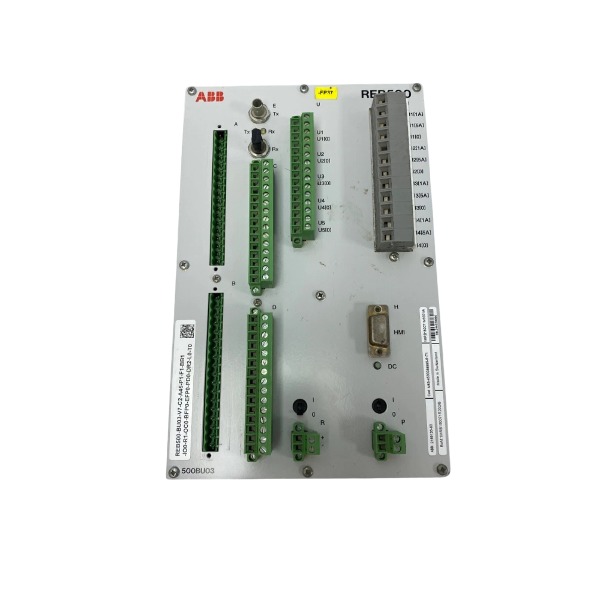







Description
-
BrandABB
-
ModelREB500-BU03
-
Product NameBay Unit for REB500 Busbar Protection
-
Place of OriginSweden
-
Customs HS Code85371011
-
Part number1MRB150071M0001
-
Dimensions440mm × 320mm × 160mm
-
Weight7.8 kg
-
Operating Temperature-25°C ~ +70°C
-
Storage Temperature-40°C ~ +85°C
-
Warranty12 month
-
Product Statusbrand new
Common Faults and Solutions for ABB 1MRB150071M0001 REB500-BU03
Major-Error 013 Wrong battery voltage configured
Cause: The battery voltage parameter defined in the configuration setfile is incorrect.
Solution: Adjust the battery voltage parameter in the setfile and re-download the updated configuration to the BU03 unit.
Major-Error 014 BU hardware failure
Cause: Internal circuit damage inside the BU module.
Solution: Replace the REB500-BU03 module.
Major-Error 016 / 017 Repetitive startup error
Cause: Faulty analog input wiring or incorrect CT/VT parameter configuration.
Solution: Inspect CT and VT wiring, confirm the transformer ratio settings; clear the permanent protection block via LHMI once the defect is rectified.
Major-Error 021 Repeated BU restart
Cause: Unstable power supply, optical interference on the process bus or inherent hardware defect.
Solution: Test the 24V DC control power supply; clean and inspect fiber optic connectors; replace damaged fiber cables; substitute the BU module if restarts persist.
Optical fiber / Process bus communication alarm
Cause: Contaminated fiber end faces, fiber breakage, excessive bending, or faulty network switch.
Solution: Clean fiber connectors; examine cable routing and bending radius; measure optical power; replace faulty fiber or switch hardware.
IP address conflict alarm
Cause: The IP address assigned to BU03 overlaps with another device on the process bus.
Solution: Modify the IP address in the configuration; ensure every CU and BU on the bus has a unique IP address.
Hardware mismatch alarm
Cause: The hardware model configured in the setfile does not match the physically installed BU unit.
Solution: Update the project hardware configuration to match the actual module, then download the corrected setfile.
RPB interruption alarm
Cause: Loose RPB bus cables, poor contact, or improper bus termination.
Solution: Check RPB wiring and terminating resistor; retighten all terminals; restart the BU after reconnection.
Isolator / binary auxiliary contact signal error
Cause: Miswired isolator auxiliary contacts or wrong binary signal mapping in configuration.
Solution: Cross-check wiring against schematic drawings and revise binary input assignments within the setfile.
Differential current alarm
Cause: Reversed CT polarity, open CT secondary circuit, loose terminals, or defective analog channel inside BU.
Solution: Verify CT wiring and polarity; test the CT secondary loop; inspect BU analog input terminals; replace the BU if its analog channel is damaged.
No LED indication, unit power-off
Cause: Absent 24V control supply or failure of the internal power circuit.
Solution: Measure the incoming 24V DC voltage; check the fuse on the power terminal; replace BU03 if the input power is normal.
Failed connection via LHMI / PC tool
Cause: Mismatched PC subnet, Ethernet cable inserted into reserved port X0, or offline process bus.
Solution: Confirm the PC IP subnet; remove the cable from port X0; check process bus status; reboot CU and BU modules.
Invalid time stamp / time synchronization fault
Cause: Time master device offline, incorrect synchronization mode setting, or broken fiber link to the time master.
Solution: Check the status of the time master; validate synchronization parameters; inspect the optical path for time transmission.
Permanent protection blocking after fault
Cause: Recurring critical faults activate the protection interlock blocking function.
Solution: Resolve the root cause of the fault first, then execute the block reset function from the LHMI menu of the corresponding BU.

Confirm the 24V DC rated control power supply prior to commissioning. Ensure steady output and adequate ripple attenuation. Use a regulated DC supply equipped with surge protection, and do not share the same power circuit with large inductive loads.
Inspect CT and VT wiring in strict accordance with schematic drawings. Verify correct polarity and secure crimped terminal connections. Take precautions to avoid open-circuit conditions on CT secondary circuits during wiring, testing and maintenance activities.
Carry out routine inspections on process bus optical fibers. Keep fiber end faces clean, and prevent sharp bends, twisting or physical compression. Maintain the minimum specified bending radius for fiber cables, and shield fiber connectors against dust, moisture and mechanical stress.
Thoroughly validate configuration files before downloading. Confirm that the hardware model, CT/VT transformation ratios, battery parameters and IP settings correspond to on-site conditions. Never download unvalidated setfiles to BU units that are in operation.
Allocate distinct IP addresses for every CU and BU on the process bus to rule out IP conflicts.
Periodically examine RPB bus terminals and terminating resistors to guarantee firm connections and correct bus termination.
Keep the cabinet interior clean, dry and dust-free. Maintain the ambient temperature within the manufacturer’s specified operating range. Prevent condensation inside the cabinet; fit heaters or dehumidifiers for sites with high humidity.
Retighten all power and signal terminals during scheduled maintenance to address loosening caused by mechanical vibration.
Avoid plugging Ethernet cables into the reserved port X0 of the BU03 without authorization.
Create backups of the latest configuration setfile, event logs and firmware information each time modifications are made.
Keep the firmware version synchronized with the paired CU system and refrain from incompatible cross-version firmware upgrades.
Run regular communication checks on the process bus, and continuously monitor optical power levels and bus loading conditions.
Schedule periodic inspections for the backup battery. Replace the battery before the end of its service life to preempt battery voltage alarms.
Review alarm logs on a regular basis. Investigate minor alarms at an early stage before they escalate into serious failures.
Separate the module from interference sources including high-power inverters and contactors. Lay power and signal cables separately and apply proper shielding.
Adhere strictly to lockout-tagout safety procedures during maintenance to prevent unintended power loss and incorrect wiring.

FAQ: ABB 1MRB150071M0001 REB500-BU03 Busbar Protection Relay
Q: What is ABB 1MRB150071M0001 REB500-BU03?
A: ABB 1MRB150071M0001 is the part number for REB500-BU03, a unit of the ABB REB500 busbar protection system, used for substation busbar differential protection and breaker failure protection.
Q: What is the core function of REB500-BU03?
A: It provides high-speed busbar differential protection, breaker failure protection, fault detection and trip logic for medium and high voltage switchgear busbars.
Q: What communication protocols does ABB REB500-BU03 support?
A: It supports IEC 61850, IEC 60870-5-103, Modbus and MVB interfaces for connection with substation SCADA and protection control systems.
Q: What software is used to configure and test REB500-BU03?
A: ABB PCM600 software is used for parameter setting, protection configuration, fault record analysis, commissioning and firmware management.
Q: What are the typical application scenarios of REB500-BU03?
A: It is widely applied in power utility substations, industrial power plants, petrochemical plants and mining HV/MV switchgear rooms for busbar safety protection.
Q: What is the operating temperature range for ABB REB500-BU03?
A: Operating temperature range: -5°C to 55°C, designed for standard substation control cabinet installation.
Q: Is REB500-BU03 a standalone protection relay?
A: REB500 is a distributed busbar protection system; BU03 is a bay unit, it works together with other REB500 units to complete full busbar protection.

GDB021BE
Unitrol 1020
698B275U01
SM810K01
BC810K02
PP886
PBA800
RED615


.jpg)

.jpg)
.jpg)
.jpg)







