





47693FBD830440F99BD2D1F29EF9684A.jpg)
.jpg)
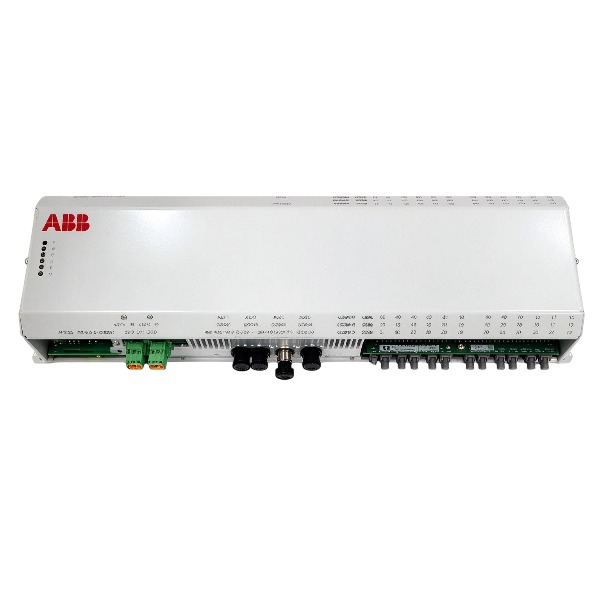







Description
-
BrandABB
-
ModelPPD513A0C-110440
-
Product NameAC800PEC Processor Module
-
Place of OriginSweden
-
Customs HS Code85371011
-
Part number3BHE039724R0C4A
-
Dimensions365 mm × 195 mm × 40 mm
-
Weight1.8 kg
-
Operating Temperature-20℃ to +70℃
-
Storage Temperature-40℃ to +85℃
-
Warranty1 year
-
Product Statusnew and original
Digital I/O Commissioning for ABB PPD513A0C-110440 (3BHE039724R0C4A)
1. Pre-commissioning inspection & safety preparation
Implement LOTO lockout and tag-out. Inspect module and terminal unit for mechanical damage. Check digital I/O wiring of DI/DO terminals, verify 24VDC process power, cable shielding and single-point grounding; confirm no ground loops. Disconnect all field-side wiring for dry loop test. Measure insulation resistance and check for short/open circuit of each digital channel. Confirm DI/DO channel terminal definition matches the I/O list.
2. Hardware installation and rack power-on
Insert PPD513 module into the assigned rack slot and fasten front screws. Power on rack and 24VDC field auxiliary supply. Watch module LED indicators and wait for hardware self-test completion. Confirm RUN LED is green; if fault LED is active, power off and check backplane contact and terminal wiring.
3. Engineering configuration and I/O mapping
Connect PC with Control Builder M to AC800M rack. Detect PPD513 module in hardware tree, verify firmware version. Enable digital DI and DO channels in hardware configuration. Set DI type: sink/source mode, enable wire-break diagnostics if required. Set DO type: relay or transistor output, configure fail-safe state (ON/OFF) when module fault occurs. Map DI/DO hardware channels to control logic variables, download hardware configuration and application program to controller and PPD513 module. Save project backup file.
4. Offline digital input (DI) test (field side disconnected)
Supply 24VDC to DI terminals one by one. Check channel status in Control Builder M online monitor. When DI terminal gets 24VDC, corresponding DI variable turns TRUE; remove 24VDC, variable returns FALSE. Verify channel diagnostic alarm: simulate open circuit or abnormal voltage to check wire-break fault reporting. Record each channel status and diagnostic response.
5. Offline digital output (DO) test (field side disconnected)
Force DO variables TRUE/FALSE from software online interface. Check module front LED status and measure DO terminal status with multimeter or continuity tester.
For relay DO: Confirm NO/NC contact switching action when DO is toggled.
For transistor DO: Verify 24VDC output presence at ON state and no voltage at OFF state.
Check fail-safe fallback behavior: trigger module fault simulation to confirm DO falls back to predefined safe state. Record test results.
6. Reconnect field cables and on-site live signal test
Cut off power, reconnect field devices (limit switch, proximity switch, solenoid valve, relay). Restore rack and 24V auxiliary power.
DI live test: Actuate field switches on site, verify DI status change in software and HMI.
DO live test: Send DO command from control software, check field actuators can be energized/de-energized correctly. Confirm no contact bounce or unstable state.
7. Interlock, alarm and event test
Test DI fault diagnostics (wire break, power loss). Confirm fault alarms and event messages can be uploaded to HMI and event log. Execute logic interlock sequence test; verify DI trigger conditions can correctly drive DO actions. Test local/remote mode switching for digital signals.
8. Long-run stability check
Keep digital I/O in cyclic switching state for continuous running test. Monitor bus communication status and module diagnostic information, check for intermittent signal dropout or random fault. Eliminate interference caused by improper grounding or cable routing.
9. Commissioning documentation and handover
Record all DI/DO channel test records, fault response and interlock test data. Backup complete project configuration. Restore module to normal operation mode, enable all diagnostic and interlock functions, then hand over to site operation team.

Commissioning Steps for ABB PPD513A0C-110440 (3BHE039724R0C4A)
Pre-commissioning Safety & Hardware Inspection
Isolate power to the rack and all field signal loops and perform lockout-tagout (LOTO). Confirm the module model as PPD513A0C-110440 with part number 3BHE039724R0C4A. Inspect the module surface for physical damage, scratches or burn marks. Examine the backplane slot to ensure no bent pins and reliable contact. Check wiring of analog inputs, analog outputs and digital I/O as well as shield earthing; ensure single-point shielding and eliminate ground loops. Measure cable insulation resistance and test all signal loops for short circuits and open circuits.
Module Installation and Rack Power-on Preparation
Insert the PPD513 module into the assigned rack slot and tighten the front panel fixing screws. Confirm the rack power supply rating complies with module specifications. Disconnect all field-side signal terminals for dry contact testing. Close the cabinet door, remove LOTO tags and energize only the rack power supply.
Power-up and Hardware Self-test
Switch on the rack power. Observe front panel LED indicators during module initialization. Wait for completion of the module self-diagnosis sequence. Check status LEDs: the green RUN LED shall illuminate if hardware operates normally. If the red fault LED is active, read the fault code, de-energize power and recheck backplane contact and module condition.
Establish Communication Connection
Connect a PC installed with Control Builder M to the control rack. Confirm the module is identified in the hardware tree. Verify the module firmware version matches project requirements. Download hardware configuration including slot address, channel type, signal range and fault detection parameters to PPD513A0C. Save a local backup of parameter files.
Channel Parameter Configuration
Define the type for each channel: AI, AO, DI or DO. Configure signal ranges such as 4-20mA, 0-10V or custom ranges. Enable channel diagnostics including wire break detection, short-circuit detection and over-range alarms. Set the filter time constant for analog channels and configure high/low limit alarm thresholds. Define safe fallback values for AO channels when module faults occur.
Offline Channel Simulation Test (Field Cables Disconnected)
For AI channels: Inject standard signals with a signal calibrator, verify readings in Control Builder M match the input values and confirm alarms trigger at over-range and under-range conditions.
For AO channels: Send setpoints via software, measure output current or voltage with a multimeter and validate output precision.
For DI channels: Switch dry contact inputs and verify status feedback within the software.
For DO channels: Activate output commands, measure contact status and check LED indications.
Record all channel test results.
Field Loop Reconnection and On-site Signal Verification
Power down the rack, reconnect cables for field sensors and actuators, then restore power. Verify live field signals: read process variables from transmitters and check the response of field actuators to AO commands. Ensure all signal values remain stable without abnormal fluctuations. Check for interference caused by incorrect earthing or improper cable routing.
Interlock and Logic Function Test
Integrate the module with AC800M controller logic. Carry out local and remote mode switching tests. Validate channel fault alarms for wire break, short circuit and over-range conditions; confirm alarm messages are transmitted to HMI and event logs. Verify AO safety fallback actions when module failure happens.
Tuning and Performance Optimization
Adjust analog filter parameters to suppress noise while preserving response speed. Calibrate channel gain and offset if measurement deviation exists. Monitor module bus load and communication cycle time to prevent communication timeouts.
Final Verification and Documentation
Perform continuous heat soak testing for the required duration. Confirm no new faults or value drift occur. Back up the full project configuration and module parameter files. Record all commissioning data, calibration records and fault logs. Sign the commissioning report and complete handover to the site operation team.
Post-commissioning
Set the module to normal operating mode. Monitor real-time status through HMI and Control Builder M. Keep all protection and alarm logic enabled for regular operation.

FAQ for ABB PPD513A0C-110440 (3BHE039724R0C4A)
Q: What is ABB PPD513A0C-110440 (3BHE039724R0C4A)?
A: It is an AC800PEC high-performance processor module, designed for power generation excitation control and high-speed power electronics regulation.
Q: What are its typical application scenarios?
A: It is widely used in hydro power, thermal power and combined-cycle power plants for generator excitation and grid connection control.
Q: What core capabilities does this ABB processor module offer?
A: It delivers fast real-time control, advanced excitation algorithms, event logging and comprehensive system diagnostic functions.
Q: Can PPD513A0C-110440 be used for legacy system retrofits?
A: Yes, it is a common spare part for AC800PEC series, suitable for old excitation control system maintenance and upgrade projects.
Q: What communication interfaces are supported on this module?
A: It supports high-speed optical communication and standard industrial interfaces for reliable data exchange and parameter configuration.
Q: How can I get pricing and stock status of ABB PPD513A0C-110440?
A: Please send your inquiry to us, we will check stock availability and prepare a formal quotation for you promptly.

GDB021BE
Unitrol 1020
698B275U01
SM810K01
BC810K02
PP886
PBA800
RED615


.jpg)

.jpg)
.jpg)
.jpg)







