





F8AF08EBEA6742BFA86F64499405DB4A.jpg)
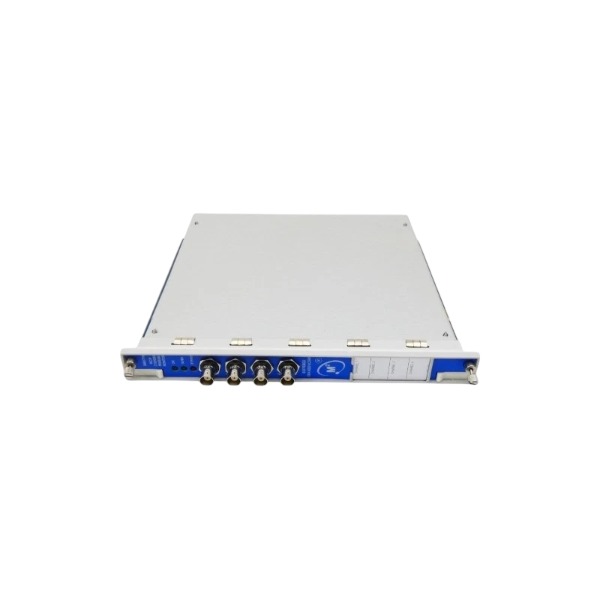







Description
-
BrandBENTLY
-
Model3500/77M
-
Product NameRecip Cylinder Pressure Monitor Module
-
Place of OriginUnited States
-
Customs HS Code85437099
-
Power Supply+5.1 V DC
-
Dimensions305 mm × 220 mm × 30 mm
-
Weight1.0 kg
-
Operating Temperature0℃ to +60℃
-
Storage Temperature‑40℃ to +85℃
-
Warranty1year
-
Product Statusnew
Bently Nevada 3500/77M Commissioning Procedure
Pre-commissioning Check
Verify complete hardware assembly: Confirm 3500 rack, dual power supply, 3500/22M TDI interface module and 3500/77M are correctly installed in designated slots; fasten module screws to ensure reliable grounding.
Check firmware compatibility: Ensure 3500/77M firmware version Rev-L or above, consistent with the host 3500 system software version.
Inspect field wiring: Check connection integrity of piezoelectric pressure transducer cables to rear terminal blocks; confirm no short circuit, open circuit or insulation damage.
Verify key-phasor wiring: Ensure valid key-phasor (multi-event wheel) signal connection, which supports crank angle calculation and synchronous monitoring.
Complete software connection: Connect the configuration PC to the 3500/22M TDI module via Ethernet or USB for online configuration.
Step 1 Rack Online and Hardware Configuration
Launch the Bently 3500 configuration software and establish stable online connection with the 3500 rack.
Enter hardware editing mode, add the 3500/77M module to the corresponding slot.
Set the module operating mode to Reciprocating Cylinder Pressure Monitor.
Save the completed hardware configuration file.
Step 2 Basic Channel Parameter Configuration
Open the parameter page for each 3500/77M channel individually.
Select the sensor type as certified piezoelectric cylinder pressure transducer.
Configure transducer sensitivity (pC/bar or pC/psi) and full-scale pressure range.
Set channel tag, cylinder number and measurement unit (bar/psi).
Assign the valid key-phasor channel to realize crank angle synchronization.
Enable or disable monitoring parameters as required, including suction/discharge pressure, maximum/minimum pressure, compression ratio and rod load.
Step 3 Alarm Setpoint Configuration
Configure Alert alarm values and delay time for all enabled monitoring parameters.
Select up to two key parameters to set Danger (trip-level) alarm thresholds and delay time.
Configure alarm voting logic and alarm inhibit conditions according to system requirements.
Bind Alert and Danger alarms to system internal relays or external 3500 relay modules.
Step 4 Communication and Output Configuration
Set Modbus-TCP/OPC communication parameters for 3500 system to realize data transmission with DCS.
Map all 3500/77M monitoring parameters to corresponding Modbus register addresses.
Configure data transmission parameters for matching System1 condition monitoring software.
Step 5 Configuration Compilation and Download
Compile the total project and eliminate all configuration errors and warnings.
Download the complete hardware and parameter configuration to the 3500 rack.
Wait for the module automatic restart; confirm the RUN LED is steady green and no FAULT alarm is present.
Step 6 Static Simulation Test (Before Compressor Startup)
Input standard simulation signals to each channel through a piezoelectric signal simulator.
Calibrate channel display values to ensure consistent and accurate measurement data.
Simulate Alert and Danger threshold signals to verify local alarm indication, relay action and DCS remote alarm feedback.
Simulate transducer open-circuit and short-circuit faults to confirm normal fault alarm response.
Check key-phasor signal quality and verify normal display of crank angle data.
Step 7 On-site Dynamic Commissioning (Compressor Running State)
Start the reciprocating compressor, observe real-time pressure waveforms, suction/discharge pressure, compression ratio and rod load data.
Verify normal crank angle synchronization and complete P-V diagram display.
Compare module monitoring data with local field instrument readings and calibrate existing deviations.
Continuously monitor channel operating status to ensure no intermittent faults or signal dropout.
Confirm all alarm logics function normally, and complete pressure data can be normally uploaded to DCS and System1.
Step 8 Final Acceptance and Data Backup
Record all finalized configuration parameters in the commissioning report.
Save and back up the complete 3500 system configuration file locally.
Confirm no active faults or unacknowledged alarms exist in the rack and all monitoring channels.

Bently Nevada 3500/77M Technical Specifications
General
Applicable system: Bently Nevada 3500 rack-mounted machinery protection system
Minimum firmware version: Rev-L
Safety performance: SIL 2 capable (compliance depends on complete 3500 system configuration)
Installation: Fits standard 3500 rack slot, supports hot-swap operation
Power
Power source: Supplied through 3500 rack backplane bus
Maximum power consumption: 7.8 W under full transducer load
Input Specifications
Pressure channels: 4 independent measurement channels
Compatible transducers: Bently-certified piezoelectric or voltage-output cylinder pressure sensors
Input voltage range: +0.5 VDC ~ +10.0 VDC
Input impedance: 50 kΩ
Channel frequency response: 0-5.5 kHz for each pressure input
Key-phasor input: Shared rack-wide key-phasor signal to realize crank-angle synchronization
Calculated Measurement Parameters
Suction pressure, discharge pressure, maximum pressure, minimum pressure -Compression ratio -Peak rod compression force, peak rod tension force -Rod reversal angle -P-V curve waveform data
Alarm Functions
-Configurable Alert (warning) setpoint and time-delay for individual channels -Supports up to two Danger (trip-level) alarm thresholds with adjustable delay -Software-defined alarm voting logic and alarm inhibit function -Alarm signals can be assigned to rack internal logic or external relay modules
Communication
Internal communication: Backplane bus for data interaction with 3500/22M TDI module -External communication (via 3500/22M TDI): Modbus-TCP, OPC interface, data output for System 1 condition-monitoring platform -Configuration software: Official Bently 3500 Configuration Software
Front-panel LED Indicators
OK: Module runs normally -TX/RX: Rack backplane-bus data transmission status -Bypass: Corresponding channel is under bypass status -Fault: Module or channel failure detected
Mechanical Specification
Form factor: Full-width standard module for 19-inch 3500 rack system
Typical Calibration Scale Factors (for reference only)
100 psia: 95000 µV/psi 250 psia: 38000 µV/psi 500 psia: 19000 µV/psi 1000 psia: 9500 µV/psi 2500 psia: 3800 µV/psi 5000 psia: 1900 µV/psi 10000 psia: 950 µV/psi

3500/22-01-01-01
3500/22 288055-01
1900/65A
24765-02-01
3500/91-01-01-01
3500/44-02-01
TK-3E
177313-02-01
1900/65A-01-01-04-CN-00
2300/20-CN


.jpg)







