.jpg)
.jpg)
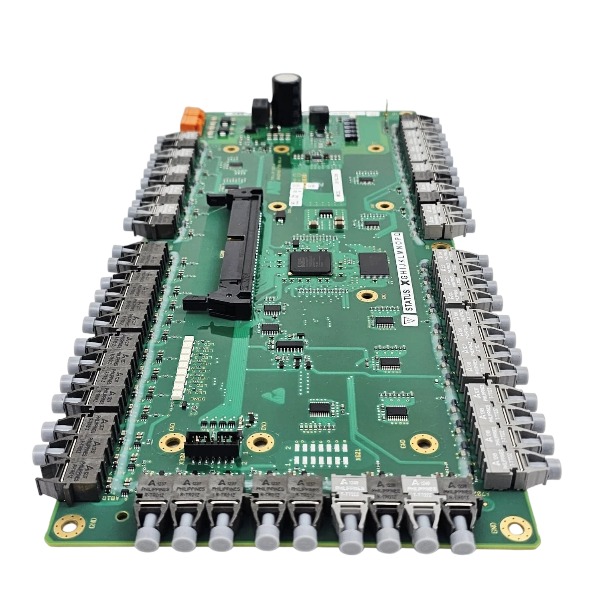







Description
-
BrandABB
-
ModelUFC921A101
-
Product NameExcitation Control Board / Main Control Unit
-
Place of OriginSwitzerland
-
Customs HS Code8537101190
-
Part number3BHE024855R0101
-
Dimensions333 mm × 160 mm × 28 mm
-
Weight0.34 kg
-
Operating Temperature0℃ to +55℃
-
Storage Temperature‑40℃ to +85℃
-
Warranty12 month
-
Product Statusnew and original
Installation and Removal Procedure for ABB UFC921A101 (3BHE024855R0101) Control Board
Safety Preconditions
Cut off the main power supply for the complete rack and implement lock-out-tag-out prior to any servicing work. Allow a minimum of 10-minute waiting period for internal capacitors to fully discharge so as to prevent electric shock hazards. Always wear an anti-static wrist strap properly grounded to the cabinet protective earth to protect PCB components against ESD damage. Avoid direct bare-hand contact with gold-finger contacts, soldered parts and optical transceiver modules.
Board Removal Steps
Document all terminal-block wiring tags and fiber-optic cable markers; take photographs as reference records.
Carefully disconnect fiber patch cords and fit dust caps onto optical ports right away.
Loosen fastening screws for the front detachable terminal blocks, draw out terminal block assemblies and disconnect all field-side cables.
Remove the two front-panel fixing screws of the UFC921A101 module.
Grip the front handle of the module and pull it out slowly to disengage gold-finger contacts from the backplane connector.
Take the complete module out of the rack slot and store it inside an anti-static bag.
Board Installation Steps
Visually inspect the new UFC921A101 unit for physical defects including scratches and burn traces before installation.
Align the module with rack guide rails and slide it smoothly into the target slot.
Apply steady pushing force until gold-finger contacts achieve full engagement with the backplane connector.
Secure the module to the rack by tightening the two front-panel mounting screws.
Refit terminal blocks and reconnect all field cables strictly in accordance with previously recorded labels.
Insert fiber-optic jumpers after removing dust caps: connect local TX port to peer-device RX port, and local RX port to peer-device TX port.
Re-examine wiring polarity, cable shielding performance and PE protective-earth connections.
Post-Installation Inspection
Make sure all connectors are fully inserted without loose terminals. Ensure no foreign objects remain within the rack slot. Confirm optical connectors are clean and mated correctly. Shut the cabinet door, remove lock-out-tag-out measures and restore system power supply. Observe module status LEDs and verify no hardware fault alarms occur after system boot-up.

Wiring Method for ABB UFC921A101 (3BHE024855R0101) Control Board
General Note
UFC921A101 serves as the main control board for ABB excitation and gas turbine control systems. Internal system bus signals are realized by plug-in connection with the backplane, while field-side signals are terminated through detachable front-mounted terminal blocks and optical fiber interfaces. All wiring operations must be carried out under complete system power-off condition with lock-out-tag-out measures enforced.
Backplane Bus Connection
Insert UFC921A101 vertically into the assigned slot of the matching backplane rack.
Ensure full engagement of gold-finger contacts between the module and backplane, then tighten the module mounting screws for secure fixation.
High-speed internal system bus, module power supply and hardware interlock signals are transmitted via the backplane without on-site manual wiring.
Power Supply Wiring (Front Terminal Block)
+24 VDC: Positive working-power input for the module, connected to stabilized 24 V DC power supply.
0 V DC: Power supply negative terminal and reference ground point.
PE/Protective Earth: Connect to the cabinet protective-earth busbar using short, large-cross-section wire; board-level shielding is grounded to the cabinet through this terminal.
Warning: AC voltage must never be applied to DC power terminals; overvoltage will cause irreversible hardware damage to the board.
Digital Input Wiring
Digital inputs adopt 24 V PNP logic. Connect signal positive to the DI pin and signal common to 0 V DC.
For dry-contact field signals: wire one contact terminal to the DI channel and the other to +24 V DC.
Shields for all input cables shall be single-end grounded inside the control cabinet.

Digital Output Wiring
These are open-collector transistor outputs, which require an external 24 V power supply for driving loads.
Connect the positive terminal of the load to external +24 V and the negative terminal to the corresponding DO pin.
Tie the output common terminal to external 0 V DC.
Free-wheeling diodes shall be paralleled on inductive loads to suppress surge voltage.
Analog Signal Wiring
Analog input (4-20 mA/0-10 V): route signal positive wire to AI+ and signal negative wire to AI-.
For 4-20 mA two-wire transmitters: supply transmitter power from cabinet-side 24 V, and feed back current signal to the AI channel.
Shielded twisted-pair cables are mandatory for all analog loops. Route analog cables separately from power cables to mitigate electromagnetic interference.
Fiber-Optic Communication Connection
TX (Transmit): Optical transmitting port, connected to the RX port of the peer communication device.
RX (Receive): Optical receiving port, connected to the TX port of the peer communication device.
Deploy ABB-compliant fiber patch cords; keep optical connectors clean and avoid bending fibers below the minimum bending radius.
Mark each fiber jumper clearly with port number and signal direction.
Grounding & Cable Routing Requirements
Signal shield: Ground the shielding layer only at the cabinet side; keep the field-equipment end of shield floating.
Separate cabling principle: power cables, digital signal cables, analog cables and optical fibers shall be laid in independent cable trays.
Maintain sufficient spacing between high-power cables and low-level signal wires.
Post-Wiring Check-up
Confirm all terminal screws are properly tightened; eliminate loose wire strands and short-circuit hazards.
Verify correct polarity of DC power, analog and digital signals.
Inspect fiber plug-in status; ensure fiber end faces are free of dust and physical damage.
Check continuity of protective-earth circuit.
Complete insulation resistance test prior to power-on; high-voltage megohmmeter test shall not be applied directly to module terminals.

GDB021BE
Unitrol 1020
698B275U01
SM810K01
BC810K02
PP886
PBA800
RED615