B8CD5E5C286A4227B5288954C0676B9F.jpg)
.jpg)







Description
-
BrandAllen-Bradley
-
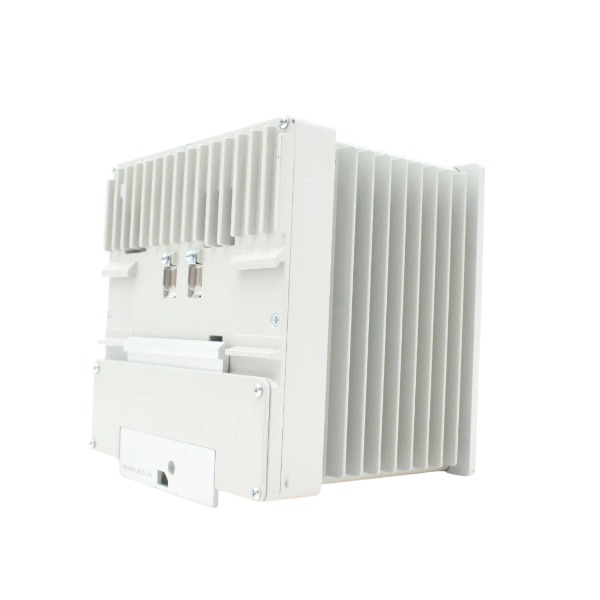
Model1783-HMS8T4CGN
-
Product NameStratix 5400 12-Port Managed Industrial Ethernet Switch
-
Place of OriginUnited States
-
Customs HS Code8517620050
-
Power Supply3.7 A
-
Dimensions164.5 mm × 155.4 mm × 146.7 mm
-
Weight2.88 kg
-
Operating Temperature-40 °C to 70 °C
-
Storage Temperature-40 °C to 85 °C
-
Warranty12 month
-
Product Statusnew
Commissioning Steps for Allen-Bradley 1783-HMS8T4CGN (Stratix 5400 Managed Switch)
1. Pre-Commissioning Preparation
Verify the hardware model is 1783-HMS8T4CGN, a Stratix 5400 managed switch equipped with 8×10/100BASE-T copper ports and 4×Gigabit combo ports. Prepare a 24 VDC power supply, Ethernet patch cords, an engineering PC installed with Studio 5000 Logix Designer and the corresponding Stratix 5400 AOP file, plus a console cable for CLI configuration if advanced tuning is required. Inspect mechanical conditions including DIN rail mounting, protective grounding and wiring clearance. Review the overall network design, covering IP addressing plan, VLAN division, DLR, QoS strategy and port allocation table.
2. Hrdware Installation and Wiring
Secure the switch onto the DIN rail and make reliable connection to the protective earth terminal. Terminate the redundant 24 VDC power terminals while observing polarity requirements. Wire the alarm relay terminals if fault indication is needed. Do not connect production equipment during this phase; only link the engineering PC to the dedicated Express Setup port.
3. Initial Power-On and POST Inspection
Apply 24 VDC power to the unit. Monitor the Setup LED: flashing green indicates IOS firmware is loading. If the Setup LED shows steady red, perform one power cycle. A continuous red LED after reboot suggests hardware failure or firmware corruption. Wait for POST completion and confirm no critical fault LEDs remain active.
4. Express Setup for Initial IP Configuration
Set the PC network adapter to DHCP or manually match the default subnet of Express Setup. Connect the PC to the Express Setup port and launch the web configuration page, logging in with the default password `switch`. Assign a static management IP address, subnet mask and default gateway. Save the basic IP settings and reboot the switch when required. Document the management IP for later access.
5. Configuration Interface Access
Three available access methods are as follows:
Web Device Manager: Input the configured static IP address in a web browser.
Studio 5000 Logix Designer: Import the Stratix 5400 AOP profile and discover the switch over the EtherNet/IP network.
CLI Console: Use terminal software via the serial console port for advanced parameter adjustment.

6. Core Network Parameter Configuration
Configure port settings including speed, duplex mode and auto-negotiation; enable or disable unused ports as needed. Create VLANs, assign access ports to target VLANs and configure trunk ports for cross-VLAN communication. Activate Device Level Ring (DLR) if the application requires ring topology, and define ring supervisor and fault detection timers. Configure QoS, IGMP snooping, broadcast storm control and port security in compliance with control network specifications. Set up SNMP, alarm relay triggers and syslog servers for remote status monitoring.
7. EtherNet/IP and Studio 5000 Integration
Add the switch to the I/O tree within Logix Designer. Configure EtherNet/IP CIP attributes and build tag-based diagnostics for port link status, power supply status and fault alarms. Download the AOP configuration to the controller and synchronize the parameters to the switch.
8. Firmware Verification and Upgrade (If Necessary)
Check the active IOS firmware version through the web manager or CLI. When an upgrade is required, obtain the official Rockwell IOS image file. Upload the firmware, activate the new image and execute a controlled reboot. Confirm the switch boots into the target firmware version after restart.
9. Isolated Functional Test
Carry out point-by-point testing for all ports, including link up/down verification and ping tests to the management IP and peer network devices. Simulate ring interruption to validate DLR fault tolerance and fast recovery performance. Trigger fault conditions to test alarm relay output, and verify that fault tags update correctly inside Studio 5000. Check for broadcast storms and unexpected network loops.
10. Field Integration and Load Testing
Connect the switch to PLCs, variable frequency drives, HMIs and field I/O modules. Continuously monitor network traffic, port error counters and switch CPU load for a period. Validate CIP connection stability under normal production load, and ensure control data transmission has no packet loss or excessive latency.
11. Configuration Saving and Documentation
Save the running configuration as startup-config to retain settings after power loss. Export the configuration file for backup. Record the management IP, firmware version, VLAN scheme, DLR parameters and port assignment in project documents. Update electrical drawings and commissioning records.
12. Post-Commissioning Handover
Deliver configuration backups and access credentials to on-site maintenance staff. Explain LED indication rules, fault alarm points and standard recovery procedures.

Power Requirements for Allen‑Bradley 1783‑HMS8T4CGN (Stratix 5400 Managed Switch)
This unit is a non-PoE industrial Layer 2 managed switch equipped with dual redundant DC power inputs.
1. Input Voltage Range
DC input operating range: 12 VDC to 54 VDC
The typical supply used in Rockwell automation cabinets is 24 VDC.
The switch is compatible with SELV and Class 2 DC power supplies.
Note: This model does not support PoE functionality, so a 44–54 V PoE-rated power supply is unnecessary.
2. Power Consumption and Current Ratings
Typical power dissipation: 35 W at 24 VDC under 40°C ambient temperature
Maximum input current: 3.7 A over the entire 12–54 VDC operating range
At the nominal 24 VDC input, the typical operating current is approximately 1.46 A. Power supply selection must include sufficient design margin beyond this value.
3. Dual Redundant Power Input Architecture
The switch features two isolated DC power terminals, Power A and Power B, designed for redundant operation:
The switch can operate normally with only a single power source, while the other serves as backup.
When both power feeds are available and healthy, the switch automatically draws power from the source with the higher voltage.
Upon failure of one supply, the unit transfers to the remaining active source seamlessly, without network outage.
The two power channels are electrically isolated, allowing connection to independent power supplies or separate DC distribution buses inside the cabinet.
4. Terminal Wiring Specifications
Recommended conductor size: 18–20 AWG (0.52–0.82 mm²), solid or stranded copper wire
Stripping length: 6.3 mm ±0.5 mm
The terminals accept DC positive and negative connections, and the hardware incorporates built-in reverse polarity protection.
The protective earth (PE) terminal must be bonded to the cabinet ground to satisfy EMC performance and safety requirements.
5. Integrated Protection Mechanisms
Reverse polarity protection
Overvoltage and undervoltage shutdown
Internal overcurrent limiting
Short-circuit protection for onboard power rails
The switch will perform controlled shutdown when the DC input drops below the minimum working voltage threshold.
6. Fault Alarm Relay (Independent of Main Power Circuits)
A dry contact fault relay is provided on the front panel; this is an output signal, not a power input:
Contact rating: 1 A at 30 VDC, or 0.5 A at 48 VDC
It is used to notify a PLC or local cabinet annunciator of power loss, hardware faults or link failure events.
7. Environmental Conditions and Power Sizing Recommendations
Operating ambient temperature range: -40°C to +70°C. Power consumption will increase marginally at elevated temperatures.
For a 24 VDC power supply dedicated to this switch, specify a rating of 2 A or higher to accommodate inrush current and derating requirements.
When multiple Stratix switches and I/O modules share a single power supply, sum all peak currents and derate the PSU in accordance with the manufacturer’s specifications.

6181P-17A3MWX1DC
1797-PS2N2
1756-PA50
1756-L81E
XM-161 1440-VDRS06-06RH
1440-DYN02-01RJ
SST-PFB3-CLX-RLL
MPL-B4530K-MJ72AA
6181P-17TSXP
6181P-12A2MW71DC
2711P-T12W22D9P
80026-520-01-R