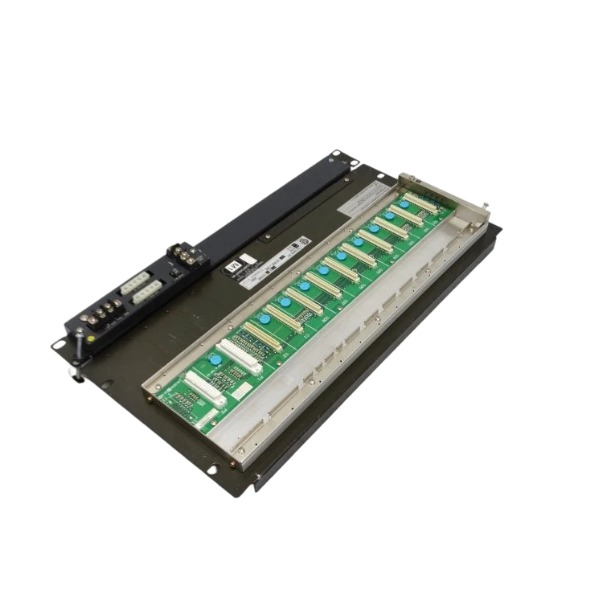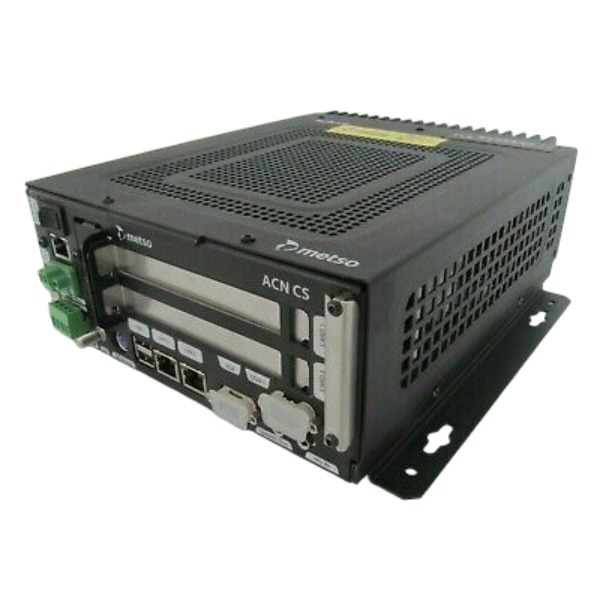







Description
-
BrandValmet
-
ModelD201925 ACN CS G1
-
Product NameACN CS G1 Node Controller Module
-
Place of OriginFinland
-
Customs HS Code85423190
-
Power Supply18‑36 V DC
-
Dimensions35 mm × 140 mm × 120 mm
-
Weight0.30kg
-
Operating Temperature‑20℃ to +60℃
-
Storage Temperature‑40℃ to +85℃
-
Warranty12 month
-
Product Statusnew brand
Valmet D201925 ACN CS G1 Technical Specifications
Power Supply & Electrical Parameters
Supply Voltage: 18-36 VDC (nominal 24 VDC)
Typical Power Consumption: 15 W
Typical Operating Current: 0.5 A @ 24 VDC
Maximum Operating Current: ≤ 0.65 A
Supported System Platforms
Native Platform: Valmet DNA (Metso DNA) DCS, serves as ACN-bus distributed control node
Onboard System: Embedded real-time RT-Linux operating system
Expandability: Supports connection with third-party PLC and DCS systems through external fieldbus interfaces
Supported Software
Valmet DNA Configuration Studio: Used for parameter setup, control logic download, firmware upgrade and equipment diagnosis
Valmet DNA Operate: Used for real-time process monitoring, alarm management and trend data display
Note: No independent third-party configuration tools required; all engineering and maintenance operations are completed via official Valmet DNA software suite
Communication Protocols
Internal Bus: Proprietary ACN real-time Ethernet for internal node communication of Valmet DNA system
Ethernet Protocol: TCP/IP, Modbus-TCP
Serial Protocol: RS-232-C, RS-485, Modbus-RTU
Fieldbus Protocol: Profibus-DP (slave mode)
Hardware Interface Summary
1 × Ethernet port (supports ACN dedicated bus and standard TCP/IP)
2 × RS-485 serial interfaces
1 × RS-232-C serial interface
1 × Profibus-DP communication port
Integrated local digital and analog I/O terminals

Parameter Configuration for D201925 ACN CS G1 Valmet Operate Software
Preconditions
1. Operator station has network connectivity to the server and ACN controller.
2. Logged-in user has corresponding access rights: Operator (view only), Advanced Operator (modify runtime parameters), Maintenance (modify alarm limits and trend configuration).
3. Control logic, I/O and graphics have been downloaded to the controller by engineering staff.
1. Modification of loop / control block runtime parameters (PID, setpoint, gain, etc.)
1.1Click the corresponding control loop object on the process graphic to pop up the loop detail panel.
1..2Switch to the Parameter tab.
1..3Editable items: Setpoint, PID Gain, Integral time, Derivative time, output limit, dead band.
1..4Click Apply to save changes. Parameters are sent to D201925 ACN CS G1 controller in real time without controller reboot.
1.5 Some critical parameters require operation password entry. The system automatically records operation logs.
Note: Greyed-out parameters mean insufficient user permission, or the parameter is locked in engineering configuration. Engineers need to unlock the editable property in DNA Explorer.
2. Alarm limit configuration (High / Low, High-High / Low-Low alarm)
2.1 Double-click the measurement point or loop to open the detail window → switch to **Alarm** tab.
2.2Modify HH, H, L, LL threshold values, alarm delay and alarm priority.
2.3 Click Apply to save; changes take effect immediately.
2.4 Interlock trip thresholds shall not be modified arbitrarily. Interlock thresholds are engineering parameters and can only be configured and downloaded in DNA Explorer.
3. Trend configuration within D201925 ACN CS G1 Valmet Operate
3.1Method 1: Drag measurement points directly into the trend window.
3.2Method 2: Open Trend tool → Add signal to select process variables.
3.3 Configurable items: time span (1min/1h/8h/24h), sampling period, axis range and curve color.
3.4Save trend template for quick recall later.
3.5Historical data archiving is managed by the historian service; Operate only provides data display.
4. Operator interface personalization
4.1 Graphic favorites: Add to favourite to configure quick navigation menu.
4.2Alarm filter: Set filter conditions by priority, unit and alarm status (unacknowledged / acknowledged).
4.3 User view layout: Window arrangement and default startup graphic, saved as current user profile.
This configuration only applies locally on the operator station and will not be downloaded to the controller.
5. User and security configuration
5.1User setting: Change personal password.
5.2Access rights are configured by engineers in DNA Explorer user manager. New account creation and permission assignment cannot be done in Operate.
Editable vs Non-editable Parameters
Items editable online in D201925 ACN CS G1 Valmet Operate:
PID runtime parameters (gain, integral, derivative, setpoint)
Process alarm limits HH/H/L/LL, alarm delay
Trend templates, graphic favorites, alarm filters and operator view layout
Items NOT editable in D201925 ACN CS G1 Valmet Operate. Must be done in DNA Explorer engineering software and downloaded to D201925 ACN CS G1 controller:
Control logic and function blocks, interlock logic
I/O channel parameters (range, signal type 4-20mA/RTD)
Hardware and bus parameters, ACN bus communication settings
Graphic drawing and tag naming
User account creation and permission assignment
Common Troubleshooting
1. Parameters greyed out and cannot be modified
Insufficient user permission; parameter marked as “not editable in operate” in engineering configuration; controller in read-only mode.
2. Parameter settings lost after operator station restart
Only local view template changed. Loop parameters have been downloaded to controller. Local layout belongs to user profile and is independent of controller.
3. Modified parameters do not take effect
Network communication failure with ACN controller; logic overrides the parameter; engineer needs to check engineering configuration.

UKB-3-35E
MFT-06
H1111.0204
HC-RFS353K
85UVF1‑1CEX
SH31004P12A2000
PW482‑50 S2
PW484-50 S1
AAR181-S50 S2
AAI143-H50 S1
85UVF1-1QD
CCM10



.jpg)
.jpg)