





273CD48963E84C9287915775075FE11A.jpg)
.jpg)
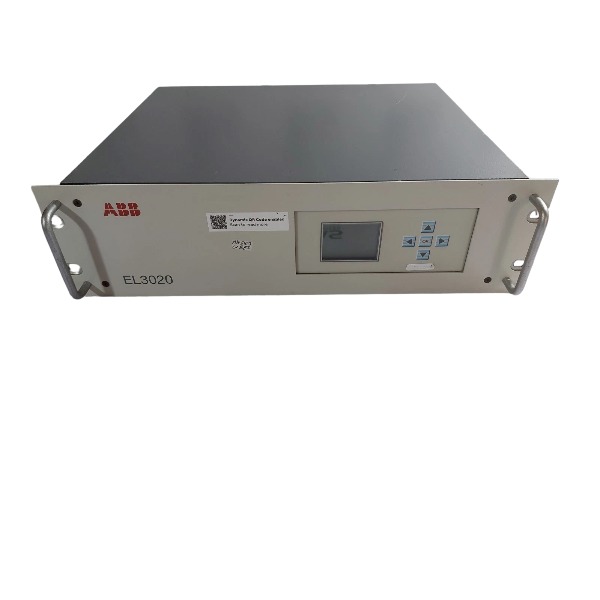







Description
-
BrandABB
-
ModelEL3020
-
Product NameEasyLine Continuous Gas Analyzer
-
Place of OriginGermany
-
Customs HS Code90271000
-
Power Supply100V AC to 240V AC, 50/60Hz
-
Dimensions483mm × 357mm × 132mm
-
Weight7kg to 15kg
-
Operating Temperature+5°C to +45°C
-
Storage Temperature-25°C to +65°C
-
Warranty12 month
-
Product Statusnew
Test Method for ABB EL3020
1. Pre-test Preparation
Implement LOTO safety procedures prior to wiring and gas connection work. Inspect mechanical installation to confirm the EL3020 is securely mounted in the 19-inch cabinet, and gas tubing, power cables, analog signal cables and communication cables are wired correctly. Prepare zero gas, span calibration gas, flow meter, leak detector, multimeter and ABB ECT configuration software. Verify sample gas parameters including inlet pressure, gas temperature, dew point and flow rate comply with specifications. Inspect filters, sample pumps and solenoid valves where equipped.
2. Gas Tightness Test
Pressurize the sample path using inert gas and block the analyzer outlet. Check all pipe joints, fittings and internal gas cells for leaks. No significant pressure drop shall occur throughout the test period; all leak points must be rectified before subsequent steps. Purge the entire gas circuit with inert gas to remove residual gas and impurities.
3. Power-on and Warm-up Test
Supply 100–240 VAC power to the analyzer. Check the power indicator and self-diagnostic messages on the local display. Allow a warm-up period of 30 to 60 minutes for optical assemblies and sensors to stabilize. Monitor internal self-check alarms and resolve hardware or temperature-related faults first.
4. Flow Test
Introduce zero gas to the analyzer inlet. Adjust the metering valve to regulate flow within the rated operating range. Confirm the flow reading remains stable without large fluctuations and validate the flow alarm function.
5. Calibration Test (Zero & Span)
Zero calibration: supply qualified zero gas, wait for readings to stabilize and perform zero adjustment via the local menu or ECT software.
Span calibration: feed span gas with certified concentration, wait for stable readings and complete span adjustment.
Units fitted with internal calibration cells may use the built-in cell for calibration as an alternative. Record calibration results, repeatability and drift data.
6. Function Response Test
Initiate the onboard function test from the analyzer menu; the test takes roughly 15 minutes. Introduce test gas and record the T90 response time. Confirm measured values follow changes in gas concentration within the permitted tolerance. Cross-compare readings shown on the local display and ECT software.
7. Analog Output Test (4–20 mA)
Use a multimeter to measure current outputs at zero, mid-scale and full-scale points. Verify linearity and confirm 4 mA corresponds to the zero point while 20 mA matches the full measuring range. Test the fault-state output under signal loss conditions.
8. Digital Communication Test
Modbus TCP/RTU: connect via ECT or PLC, retrieve measurement values, status bits and diagnostic data, and send remote calibration trigger commands.
Profibus DP (optional): validate station address, baud rate and GSD mapping, check real-time measurements and remote control functions.
Web server: access through a web browser to view measurement data and event logs.
9. Digital I/O Test
Test digital input signals including external calibration trigger and enable signals. Verify relay digital outputs for fault alarm, calibration active status and flow alarm by checking contact operation.
10. Alarm and Diagnostic Test
Simulate typical fault conditions such as flow interruption, gas leakage, temperature deviation and module errors. Confirm alarm prompts, status flags and relay alarm outputs activate as expected. Check that faults are logged with accurate timestamps in the event history.
11. Stability Long-run Test
Carry out continuous monitoring for 30 to 60 minutes with stable zero gas supply. Record zero drift and signal noise to ensure drift stays within factory specifications. Reboot the analyzer and confirm measurement and communication functions recover automatically.
12. Acceptance Criteria & Documentation
Pass criteria: no gas leakage; warm-up finishes without persistent diagnostic alarms; stable gas flow; calibration error within tolerance; acceptable response time; linear analog output; consistent communication data; reliable alarm triggering.
Document gas concentrations, calibration records, response time, 4–20 mA readings, communication status and alarm test results. Archive the ECT configuration file, calibration report and test log for project handover.

Calibration Procedure for ABB EL3020
1. Pre-calibration Preparation
Fully power on the analyzer and complete a 30–60 minutes warm-up process, ensuring no persistent hardware faults or temperature alarms.
Prepare qualified calibration gases: zero gas (nitrogen or component-free gas without target measuring gas) and certified span gas with fixed concentration matching the analyzer’s measuring range.
Inspect the entire gas sampling path, complete gas tightness test, and confirm filters, sample pumps and solenoid valves operate normally. Adjust the gas flow to the factory-rated working flow range.
Verify core parameters via the local touchscreen or ABB ECT software, including measuring range, gas component type and nominal span gas concentration.
Prepare calibration record sheets for logging calibration data, alarm status and signal output comparison results.
Calibration operations are accessible via the analyzer local touchscreen or Ethernet-connected ABB ECT configuration software.
2. Zero Calibration (Zero Point Adjustment)
Switch the gas supply to qualified zero gas, and purge the entire gas pipeline for 5–10 minutes to completely displace residual gas.
Access the maintenance menu (wrench icon) > Manual Calibration > Zero Point, then select a single target gas component or all components for calibration.
Confirm the default zero reference value of the system.
Wait for the measured value to stabilize with negligible fluctuation.
Initiate zero calibration, confirm and save the calibration data upon completion.
Record the measured zero values before and after calibration for filing.
3. Span Calibration (Full Scale Adjustment)
Switch the gas supply to certified span gas, and purge the gas pipeline continuously for 5–10 minutes.
Enter the Manual Calibration menu and select Span Calibration, then choose the corresponding gas component.
Input the official certified concentration value of the span gas.
Hold the gas supply until the analyzer reading remains stable.
Start span calibration, confirm and save the updated calibration coefficient after completion.
Record the measured span values before and after calibration.
4. Automatic Calibration (For Units with Internal Calibration Cell)
Configure automatic calibration parameters via local menu or ECT software, including calibration cycle, execution sequence and trigger modes (timed cycle, external DI signal trigger, remote communication command trigger).
Once automatic calibration is activated, the analyzer switches the internal gas path automatically. The built-in calibration cell is adopted for span calibration instead of external span gas cylinders, while zero calibration uses standard zero gas or clean air.
The analyzer automatically completes the full zero and span calibration sequence and saves the calibration results.
Check the device event log to confirm calibration success or fault prompts after operation.
Note: The internal calibration cell shall be verified with external standard gas at least once a year to ensure measurement accuracy.
5. Post-calibration Verification
Reconnect zero gas, confirm the measured value returns to the normal zero range.
Re-supply span gas to verify the reading is within the allowable accuracy error range.
Calibrate and check the 4–20 mA analog output, ensuring 4 mA corresponds to zero point and 20 mA corresponds to full measuring range.
Verify the consistency of measurement data transmitted via Modbus or Profibus DP between the analyzer and PLC system.
Troubleshoot failed calibration by checking gas purity, gas flow stability, pipeline tightness and device warm-up status. Reset calibration data via the service menu and repeat calibration if necessary.
6. Completion and Documentation
Exit the calibration menu and restore the analyzer to normal measurement mode.
Back up and save the ECT configuration file, calibration report and original test data.
Record the calibration date, span gas batch number and operator information for complete project handover records.

GDB021BE
Unitrol 1020
698B275U01
SM810K01
BC810K02
PP886
PBA800
RED615


.jpg)


.jpg)







