





648F883AD1B2460D86484726DCACABA2.jpg)
.jpg)
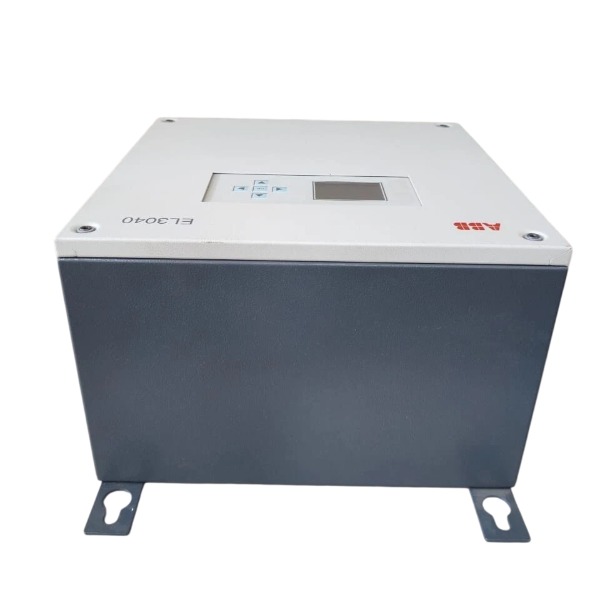







Description
-
BrandABB
-
ModelEL3040
-
Product NameEasyLine Continuous Gas Analyzer
-
Place of OriginGermany
-
Customs HS Code90271000
-
Power Supply100V AC to 240V AC, 50/60Hz
-
Dimensions360mm × 230mm × 404mm
-
Weight13kg to 21kg
-
Operating Temperature+5°C to +50°C
-
Storage Temperature-20°C to +60°C
-
Warranty12 month
-
Product Statusnew
Configuration of ABB EL3040 PROFIBUS DP Module
1. Preconditions & Hardware Installation
Power off the gas analyzer prior to installation, then insert the PROFIBUS DP module into slot -X20 or -X21 on the EL3040 main electronic board.
The module is equipped with a 9-pin Sub-D female connector for PROFIBUS RS485 bus connection.
Use standard shielded twisted-pair PROFIBUS cables. Mount 120 Ω termination resistors at both physical endpoints of the PROFIBUS segment.
This interface complies with VDI 4201 Part 2.
The factory default station address is 126. Valid operating addresses range from 1 to 125, and duplicate addresses are not permitted within a single bus segment.
2. Software Tool: ABB ECT
All PROFIBUS DP related parameters are configured through the ABB ECT configuration software.
Connect a laptop to the EL3040 Ethernet port and set the laptop IP to the same subnet as the analyzer.
Start ECT and establish communication with the EL3040. Read and back up the original configuration before making any parameter changes.
3. PROFIBUS Parameter Setup in ECT
Access the dedicated PROFIBUS configuration window:
Set the PROFIBUS station address between 1 and 125 in accordance with the PLC project assignment.
Select the baud rate to match the PROFIBUS master (PLC); automatic baud rate detection is supported.
Activate the PROFIBUS DP function.
Configure data mapping for PROFIBUS telegrams: the I/O mapping table refreshes automatically based on enabled measurement modules and gas components. Measured gas concentrations, status bits, diagnostic alarms and control commands (calibration activation, hold function and more) are assigned to PROFIBUS input and output areas. Export the GSD file from ECT for subsequent PLC hardware configuration.
4. PLC Master Configuration
Import the EL3040 PROFIBUS GSD file into PLC programming software such as Step7 or TIA Portal.
Add the EL3040 as a PROFIBUS slave station and enter the identical station address configured in ECT.
Ensure the input and output byte lengths and data structure match the definition from the PROFIBUS mapping table.
Configure watchdog and communication timeout parameters to handle bus faults.
5. Download & Activation
Download the updated configuration to the EL3040 using ECT.
Restart the analyzer to apply the PROFIBUS settings.
Check the LED indicators on the module to evaluate bus operating status and diagnostic messages.
6. Commissioning & Verification
Inspect bus wiring, cable shielding and termination resistors.
Verify real-time data in the PLC, including gas concentration readings, equipment status and fault bits.
Test remote control functions, for instance initiating automatic calibration over PROFIBUS.
Archive the final ECT project, GSD file and PROFIBUS mapping sheet for project handover.

Test Procedure for ABB EL3040 PROFIBUS DP Module
1. Pre-test Inspection
Switch off the analyzer and confirm that the PROFIBUS DP module is securely installed in slot -X20 or -X21 of the main electronic board.
Inspect the 9-pin Sub-D PROFIBUS connector and shielded PROFIBUS cable. Confirm 120 Ω termination resistors are installed at both physical ends of the bus segment.
Verify PROFIBUS parameters including station address, baud rate and I/O mapping have been downloaded using ABB ECT software, and the matching GSD file has been exported for PLC configuration.
Ensure there are no duplicated station addresses on the PROFIBUS network; valid addresses range from 1 to 125.
Carry out LOTO safety procedures before energizing the system.
2. Module LED Indicator Check after Power-on
Power LED: steady illumination indicates normal internal power supply to the DP module.
Bus / Communication LED:
Flashing: the module is powered and waiting for connection from the PROFIBUS master.
Steady on: data exchange with the PLC master is established successfully.
Permanently off or red alarm: possible module failure, incorrect address, baud rate mismatch or bus wiring defect.
Diagnostic LED: activated by module hardware faults, bus short circuits or configuration mistakes.
3. Verify PROFIBUS Configuration via ABB ECT Software
Connect a laptop to the Ethernet port of the EL3040 and launch ECT software.
Navigate to the PROFIBUS configuration page, read back parameters and cross-check against project requirements, including station address, baud rate and activation status.
Review the PROFIBUS data map to ensure gas measurement values, status words, alarm diagnostics and control registers match the installed measuring modules.
Re-export the GSD file if any measuring modules have been added or removed.

4. PLC Master Station Online Test
Open the PLC engineering software (TIA Portal / Step7), import the EL3040 GSD file and download the PLC hardware configuration.
Switch the PLC to online status and check the PROFIBUS diagnostic table:
If the EL3040 slave shows “OK / Running”, the analyzer is recognized by the PLC.
If the slave reports a fault, check for address conflicts, baud rate mismatch, termination issues, cable shielding problems or short circuits.
Monitor the input data area:
Read real-time gas component concentrations, status bits and fault flags.
Compare these readings with the local display on the EL3040 to confirm consistency.
Test PROFIBUS write commands within output telegrams:
Initiate remote zero and span calibration via PROFIBUS control bits.
Test the hold function and alarm reset command, and confirm the analyzer executes each action correctly.
5. Physical Layer & Cable Test
Use a multimeter to verify continuity of the A and B lines and rule out short circuits between A, B and the shield.
Measure the DC voltage of the PROFIBUS bus; the normal voltage range for the RS485 bus is approximately 2–5 V DC.
Check that the cable shield is grounded at a single point. Multi-point grounding must be avoided as it introduces ground loop interference.
Route PROFIBUS cables separately from high-voltage power cables and sample gas lines.
6. Stability & Intermittent Communication Test
Maintain continuous online monitoring for 30 to 60 minutes. Check the PLC diagnostic buffer for occasional communication faults or watchdog timeouts.
Simulate analyzer faults and confirm that alarm bits are transmitted to the PLC without delay.
Reboot the EL3040 and verify that PROFIBUS communication recovers automatically after the warm-up cycle.
Reboot the PLC and confirm the slave reconnects without manual intervention.
7. Fault Confirmation Criteria (Pass / Fail)
Pass criteria:
The module power LED stays on and the communication LED indicates active data exchange.
The PLC detects the slave station without bus errors.
Measured values and status information are identical on both the EL3040 local screen and the PLC.
Remote control commands sent over PROFIBUS function reliably.
No intermittent communication dropout occurs during long-duration monitoring.
Fail criteria:
The module LED remains red or shows no bus activity.
The PLC fails to identify the slave station.
Data is frozen, invalid or inconsistent.
Watchdog errors and intermittent communication loss appear frequently.
8. Final Documentation
Record the station address, baud rate, GSD version, PLC diagnostic status and all test results. Save the ECT configuration file and PLC project file for project handover.

GDB021BE
Unitrol 1020
698B275U01
SM810K01
BC810K02
PP886
PBA800
RED615




.jpg)
.jpg)







