.jpg)
.jpg)
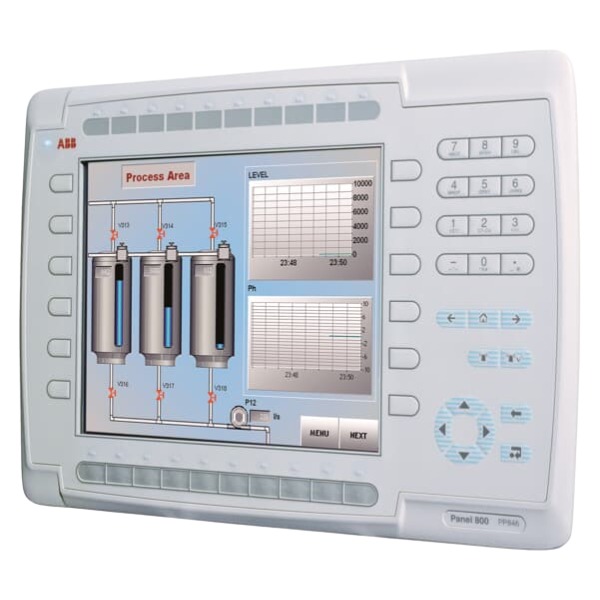







Description
-
BrandABB
-
ModelPP885R
-
Product NameRugged Industrial Touch Operator Panel
-
Place of OriginSweden
-
Customs HS Code85285211
-
Part number3BSE069296R1
-
Dimensions420 mm × 285 mm × 55 mm
-
Weight4.5 kg
-
Operating Temperature‑20℃ to +60℃
-
Storage Temperature‑40℃ to +70℃
-
Warranty12 month
-
Product Statusnew
Detailed Parameter Configuration of ABB PP885R‑3BSE069296R1 in Panel Builder 800
1. Project Creation and Hardware Selection
Launch Panel Builder 800 software and create a new project or open an existing one.
Access the hardware‑selection menu and choose PP885R‑3BSE069296R1 from the Panel800 V6 device catalogue.
Verify firmware compatibility. The configured firmware revision must match the firmware running on the physical HMI; version inconsistency will result in download failures or unexpected operational behaviour.
Configure fundamental project properties, including project name, save directory, default language, measurement unit system (metric or imperial), as well as date‑time display format.
2. Native HMI System Parameter Configuration
Open the dedicated system‑setting panel for PP885R:
Network Settings: Configure static IP address, subnet mask, gateway and DNS for LAN1 and LAN2. Activate DHCP if applicable. These settings take effect after project download and HMI reboot.
Time and Time Zone: Select the corresponding time zone. Enable NTP time synchronization and enter the NTP server IP address for network‑based time alignment.
Display and Operation: Specify the default startup screen, backlight timeout period, screensaver delay and touch‑sensitivity parameters.
Data Storage: Define storage locations and data retention cycles for historical logs, alarm records and recipe files. Choose storage medium from internal flash memory, SD card or USB drive.
User and Access Management: Set up user groups and privilege levels, assign user names and passwords, and configure permission limits for screen access and button operations.
3. Communication Parameter Setup
Open the communication driver manager and add required device drivers such as ABB AC500, Modbus TCP, Modbus RTU.
Create new communication channels:
Ethernet channel: Enter IP address and port number of the connected PLC or controller.
Serial channel: Select COM port, baud rate, data bits, parity mode and stop bits.
Add target device instances under each communication channel.
Build tag lists and map PLC physical memory addresses to HMI internal tags. Define data type, scaling factor, offset value and descriptive information for each tag.
Activate communication monitoring and configure alarm logic for communication breakdown events.
4. Configuration for Screens, Alarms, Trends and Recipes
Graphic Screens: Develop operator monitoring screens. Insert functional objects including push‑buttons, status indicators, value displays, trend viewers and pop‑up dialogues. Link graphic components to predefined tags, and configure button actions, colour‑change rules and animation logic.
Alarms: Construct alarm tables and associate trigger conditions with relevant tags. Define alarm priority, descriptive text, acknowledgement requirement and audible alert. Set up alarm storage strategy and dedicated alarm display window.
Trend Curves: Insert trend objects and select tags for data logging. Configure sampling cycle, time span, curve colour and axis range, and specify saving regulations for historical trend data.
Recipes: Create recipe data tables and bind recipe parameters to corresponding HMI tags. Enable save, load, upload and download functions, and assign target storage path for recipe files.
5. Project Compilation and Download Configuration
Initiate project compilation and resolve all reported errors and warnings.
Open download dialogue and input the IP address of the PP885R HMI.
Select download items: application project files, HMI system‑parameter updates, and optional firmware upgrade package.
Start the download process and maintain stable Ethernet connection. The HMI will automatically restart once download finishes.
6. Offline Simulation and On‑site Commissioning
Prior to downloading to physical hardware, run offline simulation to validate screen behaviours, tag interaction, alarm triggering and recipe‑related functions.
After HMI reboot, perform online verification: check tag read‑and‑write performance, alarm popup response, historical trend recording, recipe loading and user‑privilege enforcement.
Export and securely archive the complete project file after successful commissioning.

Parameter Setting for ABB PP885R-3BSE069296R1
The PP885R is an HMI unit from the ABB Panel800 V6 product family. All complete project-level parameters shall be configured on a personal computer with Panel Builder 800 software. Only limited basic system parameters are adjustable directly on the touch panel; graphic screens, communication tags and application logic cannot be modified on the HMI itself.
1. Pre-requisites
Hardware wiring: Supply 24 VDC operating power. Establish connection between PC Ethernet port and HMI LAN1 using network cable, or adopt direct USB connection.
PC software: Install Panel Builder 800 whose version is compatible with the actual firmware running on the HMI.
Power up the HMI, enter system desktop and obtain its local IP address from system settings.
2. Local Touch-panel System Settings
Click the setup icon at bottom-right corner to launch system menu.
Network Parameters
LAN1 / LAN2: Set static IP address, subnet mask, gateway and DNS, or enable DHCP mode.
Serial ports COM1(RS232) and COM2(RS422/485): Configure baud rate, data bits, parity bit and stop bits.
Display and Touch
Adjust screen brightness, backlight timeout and screensaver period; execute touch-screen calibration.
System Time
Manually set date and time, or enable NTP time synchronization and fill in NTP server address.
User Management
Change local system password and manage user access permissions.
Backup & Storage
Export system configuration and logs to SD-card or USB flash drive; import backup configuration files; restore factory-default settings.
Note: Application-oriented parameters, such as communication protocols, PLC tags, graphic screens, alarms and recipes, are not accessible for modification via local HMI menu.
3. Project Parameter Configuration in Panel Builder 800 (PC-side)
Create a new project or open an existing one, then select hardware model **PP885R-3BSE069296R1**.
Communication Configuration
Add corresponding PLC drivers including ABB AC500, Modbus TCP, Modbus RTU, etc.
Configure IP or serial-port parameters and finish tag-to-PLC-address mapping.
HMI System Parameters
Define HMI local IP address, time zone, startup screen, storage paths for alarms and recipes.
Set retention duration of historical logs, display language, engineering unit and date-time format.
Screen and Function Parameters
Design monitoring screens, functional buttons, trend curves, alarm messages and recipe tables.
Configure user access levels, operation passwords and pop-window logic.
Project Download
Method 1 (Ethernet): Enter HMI IP address for online full-project download.
Method 2 (USB / SD-card): Export project file to USB storage media and import it on-site from HMI.
4. Optional Firmware Upgrade
Carry out online firmware update through Panel Builder, or import firmware package via USB storage. Power supply must remain stable throughout the whole upgrade procedure; power interruption is strictly prohibited.
5. Commissioning & Verification
The HMI automatically reboots upon completion of project downloading.
Validate network communication, PLC tag read-write performance, alarm functions, recipe operation and time synchronization status.
Keep a secure backup copy of the final project file.

GDB021BE
Unitrol 1020
698B275U01
SM810K01
BC810K02
PP886
PBA800
RED615


.jpg)