





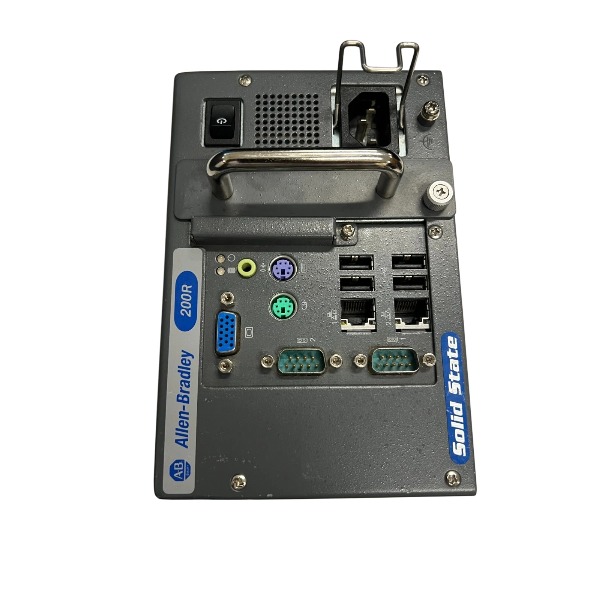







Description
-
BrandALLEN BRADLEY
-
Model6155R-NPXP
-
Product NameCompact Non-Display Industrial Computer
-
Place of OriginUnited States
-
Customs HS Code84714900
-
Power Supply100–240 V AC, 47–63 Hz
-
Dimensions115 mm × 172 mm × 158 mm
-
Weight1.9 kg
-
Operating Temperature0°C to +55°C
-
Storage Temperature-40°C to +85°C
-
Warranty12 month
-
Product Statusnew
Wiring Instructions for Allen‑Bradley 6155R‑NPXP Industrial Computer
Plug the AC power cable into the rear AC inlet and secure it using the retention clip; connect the other end to a properly grounded AC supply.
For DC variants: supply 9–36V DC to the power terminals and strictly observe positive (+) and negative (-) polarity.
Run the protective earth conductor to the M5 chassis ground screw to meet EMC and safety grounding requirements.
Torque DC terminal screws to 0.687 N·m (6.1 lb·in).
Insert shielded Ethernet cables into the LAN ports, and run the far ends to EtherNet/IP switches or controllers.
Separate Ethernet wiring from high-voltage power cables to minimize electromagnetic interference.
Connect USB peripherals to USB ports for program upload, download and data storage purposes.
Wire serial communication lines to RS232/RS485 ports if interfacing with older legacy equipment.
Attach the display cable to the video output port when a local monitor is required.
Inspect cable insulation and verify no short-circuit risks before energizing the unit.
Fit dust caps on unused ports to prevent debris ingress and suppress interference.
Terminate cable shields at both ends for long-distance industrial communication runs.

Sign in to the 6155R-NPXP using an administrator account.
Launch Windows Settings from the Start menu, and go to System > Remote Desktop.
Turn on the Enable Remote Desktop option and confirm the system prompt.
Select authorized user accounts under “Select users that can remotely access this PC”.
Validate that the Windows Firewall inbound rule for Remote Desktop (TCP 3389) is enabled.
Activate Network Level Authentication to strengthen connection security.
Record the device’s hostname or static IP address for remote client access.
Test the remote session from another PC with the Remote Desktop Connection utility.
Apply complex passwords for all remote login accounts.
Avoid exposing port 3389 to untrusted industrial networks; deploy FactoryTalk Remote Access for secure off-site maintenance.

FAQ for Allen‑Bradley 6155R-NPXP Industrial Non-Display Computer
Q: What is Allen‑Bradley 6155R-NPXP?
A: The Allen‑Bradley 6155R-NPXP is a non-display industrial computer from the 6155R series, built for factory automation, data collection and control system operation in rugged industrial environments.
Q: What operating system does the 6155R-NPXP run?
A: It is pre-installed with Windows XP Embedded, optimized for stable operation with Rockwell automation software.
Q: What communication ports does the 6155R-NPXP include?
A: It comes with Ethernet ports, USB ports, serial RS232 ports, supporting EtherNet/IP and common industrial communication protocols to connect PLCs and field devices.
Q: Can the 6155R-NPXP work with ControlLogix PLC?
A: Yes, it is compatible with Allen‑Bradley ControlLogix, CompactLogix platforms, and supports Studio 5000, RSView32 and other Rockwell HMI and monitoring software.
Q: Is the 6155R-NPXP suitable for cabinet installation?
A: Yes, it adopts industrial rack mounting design, suitable for installation inside electrical control cabinets of production lines.
Q: What industries use the Allen‑Bradley 6155R-NPXP?
A: It is widely used in automotive manufacturing, food & beverage, chemical, water treatment and general factory automation.
Q: Is Allen‑Bradley 6155R-NPXP discontinued?
A: This model has reached end of production. We provide original surplus stock and fully tested used units for equipment maintenance and replacement.

6181P-17A3MWX1DC
1797-PS2N2
1756-PA50
1756-L81E
XM-161 1440-VDRS06-06RH
1440-DYN02-01RJ
SST-PFB3-CLX-RLL
MPL-B4530K-MJ72AA
6181P-17TSXP
6181P-12A2MW71DC
2711P-T12W22D9P
80026-520-01-R


.jpg)

.jpg)
.jpg)







